


챗GPT가 안 되면 먼저 OpenAI 상태 페이지에서 서비스 장애인지 봅니다.
장애가 아니라면 증상에 따라 볼 곳이 갈립니다. '차단됨' 오류는 VPN과 접속 위치, 앱의 DeviceCheckError는 기기 날짜·시간과 앱 버전, 모델이 잠긴 경우는 사용 한도와 계정 보안이 먼저입니다.
네이버 지식iN에서 '챗GPT 안됨'으로 검색되는 질문이 10월 5일 기준 1만9천 건이 넘고, '챗GPT 오류'는 5,316건입니다.
내 문제일까, 서비스 장애일까?
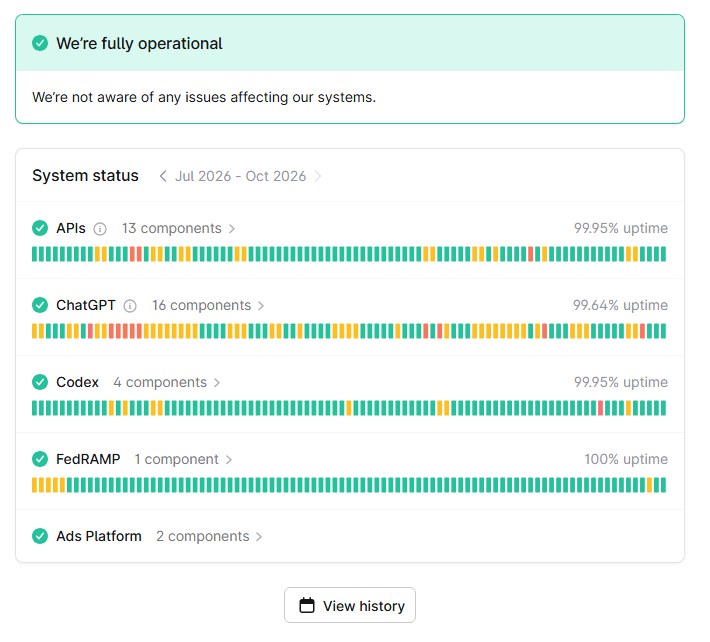
status.openai.com이 OpenAI 서비스의 상태 페이지입니다.
10월 5일에 확인했을 때는 알려진 문제가 없다는 정상 표시였고, 2026년 7월부터 10월까지 ChatGPT 가동률은 99.64%로 나와 있었습니다.
다만 이 숫자는 전체 평균입니다. OpenAI는 가용성 지표가 모든 요금제·모델·오류 유형을 합친 값이라, 개별 사용자의 가용성은 요금제와 쓰는 모델·기능에 따라 다를 수 있다고 적었습니다.
상태 페이지가 정상인데도 안 된다면 내 쪽 환경을 볼 차례입니다.
접속부터 막힐 때
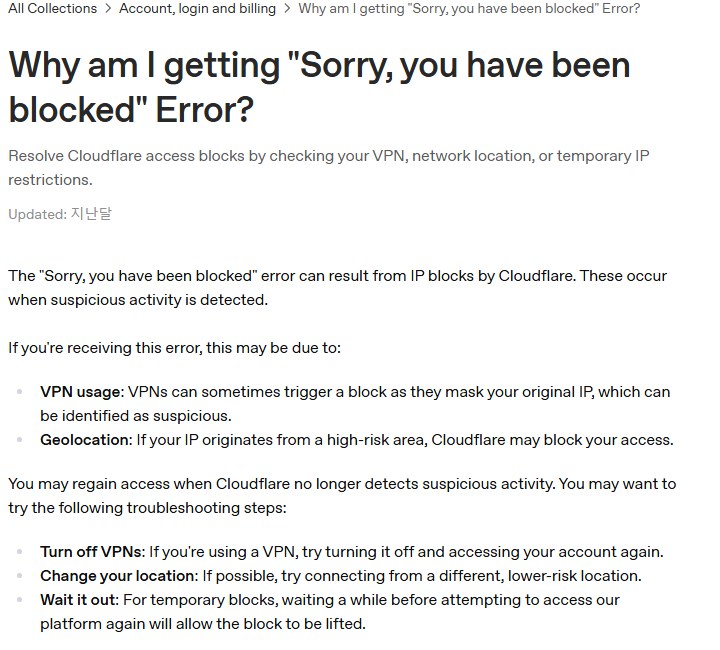
'Sorry, you have been blocked'가 뜬다면
이 오류는 의심스러운 활동이 감지됐을 때 Cloudflare가 IP를 막아서 생길 수 있다고 OpenAI는 설명합니다.
원인으로 든 것은 둘입니다. VPN은 원래 IP를 가려 의심스럽게 보일 수 있고, IP가 고위험 지역에서 온 것이면 막힐 수 있습니다.
그래서 해결도 VPN을 끄는 것부터입니다. 가능하면 다른 위치에서 접속해 보고, 일시적인 차단이라면 시간이 지나면 풀린다고 적혀 있습니다.
앱에서 DeviceCheckError가 뜬다면
기기용 토큰을 만들지 못했다는 뜻이라고 OpenAI는 설명합니다.
기기의 날짜·시간 설정과 인터넷 연결을 확인하고, 앱과 운영체제를 업데이트합니다. 루팅이나 탈옥 같은 개조도 이 오류의 원인이 될 수 있습니다.
기기 무결성 검사 결과는 최대 24시간 저장될 수 있어, 다시 시도하기 전에 앱 데이터를 지우라는 안내가 붙어 있습니다. 브라우저로 로그인하거나 다른 기기로 시도하는 방법도 있습니다.
해외에 다녀온 뒤 '지원하지 않는 지역'이라면
지원하지 않는 지역에서 인터넷을 쓴 뒤 돌아오면, 지원 국가에서 접속해도 지원하지 않는 지역이라는 오류가 날 수 있다고 OpenAI는 적었습니다.
이때는 브라우저 캐시와 쿠키를 지우고, 다른 브라우저나 시크릿 모드로 접속해 봅니다.
로그인 인증 코드가 안 온다면
새 기기나 낯선 위치에서 로그인하면 이메일로 여섯 자리 일회용 비밀번호(OTP)를 보내거나, 챗GPT 앱에 승인 알림을 보냅니다.
메일이 안 오면 스팸함을 확인하고 다시 요청합니다. OTP는 금방 만료되고, 여러 번 틀리면 계정이 잠길 수 있습니다.
진짜 메일인지 의심스러우면 발신 주소가 [email protected]이나 [email protected]인지 보라고 OpenAI는 안내합니다.
로그인은 되는데 모델이 잠겼다면
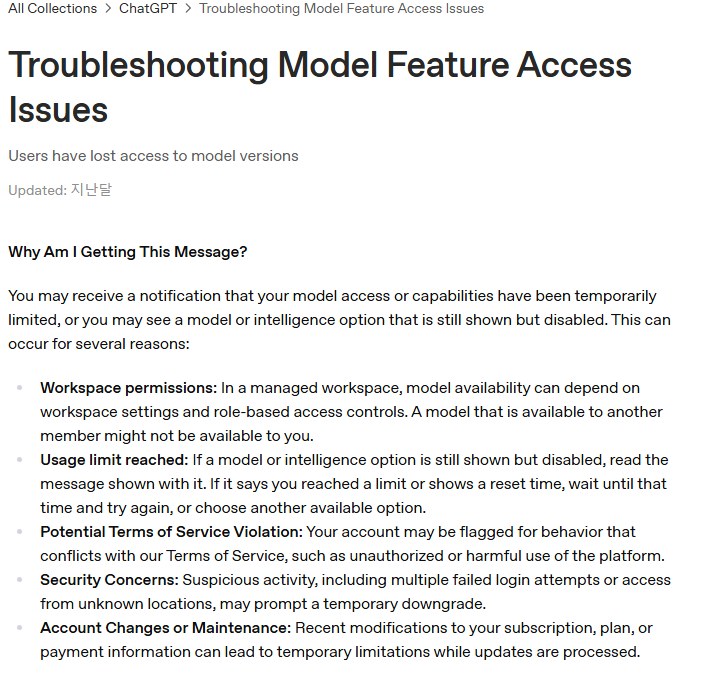
모델 접근이나 기능이 일시적으로 제한됐다는 알림이 오거나, 모델 선택지가 보이는데 누를 수 없는 경우입니다.
가장 먼저 볼 것은 그 옆의 안내 문구입니다. 한도에 도달했다거나 재설정 시각이 적혀 있다면 그 시각까지 기다리거나 다른 선택지를 고르라고 OpenAI는 적었습니다.
관리자가 있는 워크스페이스라면 쓸 수 있는 모델이 워크스페이스 설정과 역할에 따라 다릅니다. 다른 구성원은 되는데 나만 안 되는 이유일 수 있어, 워크스페이스 소유자에게 확인을 요청합니다.
보안 문제로 제한되기도 합니다. 로그인 실패가 여러 번 있었거나 낯선 위치에서 접속했다면 일시적으로 낮춰질 수 있고, 비밀번호를 바꾸고 2단계 인증을 켜라는 것이 OpenAI의 안내입니다.
구독이나 결제 정보를 바꾼 직후에도 처리되는 동안 제한될 수 있습니다. 이때는 몇 시간 기다린 뒤 다시 시도합니다.
결국 확인할 순서는 셋입니다. 상태 페이지, 네트워크와 기기, 계정.
그래도 해결되지 않으면 오류 화면을 캡처해 OpenAI 고객지원에 보내라고 도움말은 권합니다.
출처 · OpenAI 공식 상태페이지 — OpenAI Status · OpenAI 공식 도움말 — Why am I getting "Sorry, you have been blocked" Error? · OpenAI 공식 도움말 — Something went wrong. Please make sure your device's date and time are set properly. Check that your internet connection is stable, then restart the app and try again. (DeviceCheckError) · OpenAI 공식 도움말 — I'm traveling to a different country and I can't access ChatGPT or the API. · OpenAI 공식 도움말 — Why Am I Being Asked to Verify My Login? · OpenAI 공식 도움말 — Troubleshooting Model Feature Access Issues
If ChatGPT isn't working, first check OpenAI's status page to see whether the service is down.
If it isn't, where to look depends on the symptom: a 'blocked' error points to your VPN and location, DeviceCheckError in the app to your device's date and time and app version, and a locked model to usage limits and account security.
On Naver's Q&A service, a search for 'ChatGPT not working' returns more than 19,000 questions as of October 5, and 'ChatGPT error' 5,316.
Is it me, or is the service down?
status.openai.com is the status page for OpenAI's services.
When checked on October 5 it showed no known issues, and listed ChatGPT uptime of 99.64% for July to October 2026.
That figure is an average, though. OpenAI says availability metrics are aggregated across all tiers, models and error types, and individual availability may vary by subscription tier and the models and features in use.
If the status page is fine but ChatGPT still fails, it is time to look at your own setup.
When you can't even get in
If you see 'Sorry, you have been blocked'
OpenAI explains that this error can come from Cloudflare blocking an IP when suspicious activity is detected.
It names two causes: a VPN masks your original IP and can look suspicious, and an IP from a high-risk area may be blocked.
So the fix starts with turning off the VPN. If possible, connect from a different location; temporary blocks lift after a while, the article says.
If the app shows DeviceCheckError
OpenAI says it means a token could not be generated for your device.
Check your device's date and time settings and your internet connection, and update the app and operating system. Modifications such as rooting or jailbreaking can also cause the error.
Integrity check results can be cached for up to 24 hours, so the article says to clear the app data before retrying. Logging in through a browser or trying another device also helps.
If you get 'unsupported region' after a trip abroad
After using the internet in an unsupported region and returning home, you may still see an unsupported-region error from a supported country, OpenAI notes.
Clear your browser's cache and cookies, then try a different browser or incognito mode.
If the login code doesn't arrive
When you log in from a new device or an unusual location, OpenAI sends a six-digit one-time password (OTP) by email or a sign-in approval to the ChatGPT app.
If the email doesn't come, check spam and request it again. OTPs expire quickly, and several wrong entries can lock the account.
If you doubt an email is genuine, check that it came from [email protected] or [email protected], OpenAI advises.
If you can log in but a model is locked
This is when you get a notice that model access or features are temporarily limited, or a model option is shown but disabled.
Read the message next to it first. If it says you reached a limit or shows a reset time, wait until then or choose another option, OpenAI says.
In a managed workspace, which models you can use depends on workspace settings and roles. That may be why it works for a colleague but not for you, so ask a workspace owner to check.
Security can also be the cause. Multiple failed logins or access from unknown locations can trigger a temporary downgrade; OpenAI advises resetting your password and turning on two-factor authentication.
Right after changing a subscription or payment details, limits can apply while updates process. In that case, wait a few hours and try again.
In the end, check three things in order: the status page, your network and device, your account.
If nothing works, the help center suggests taking a screenshot of the error and sending it to OpenAI support.