


갤럭시 AI는 삼성 공식 안내 기준으로 갤럭시 S24 시리즈 이후 출시된 스마트폰부터 지원됩니다.
기본 기능은 무료입니다. 다만 앞으로 나올 향상된 기능이나 새 서비스는 유료일 수 있다고 삼성은 적었습니다.
삼성이 소개한 기능 대부분은 삼성 계정 로그인이 필요하고, 사진 편집이나 글쓰기처럼 인터넷 연결까지 필요한 기능도 많습니다.
네이버 지식iN에서 '갤럭시 AI'로 검색되는 질문이 10월 5일 기준 1만4천 건이 넘고, '갤럭시 AI 기능'은 5,761건입니다.
S24보다 오래된 폰은 안 될까?
공식 FAQ 문구만 보면 그렇습니다.
삼성 갤럭시 AI 페이지의 FAQ는 "Galaxy AI는 S24 시리즈 이후 출시된 스마트폰부터 지원됩니다"라고 적었습니다.
그런데 삼성전자 뉴스룸에는 그보다 앞선 기종에 갤럭시 AI를 넣겠다는 발표가 두 번 있습니다.
두 안내를 함께 보면 '안 된다'보다는 '기종마다 받은 기능이 다르다'에 가깝습니다.
S23·Z 폴드5·Z 플립5 세대 — 2024년 3월 말부터
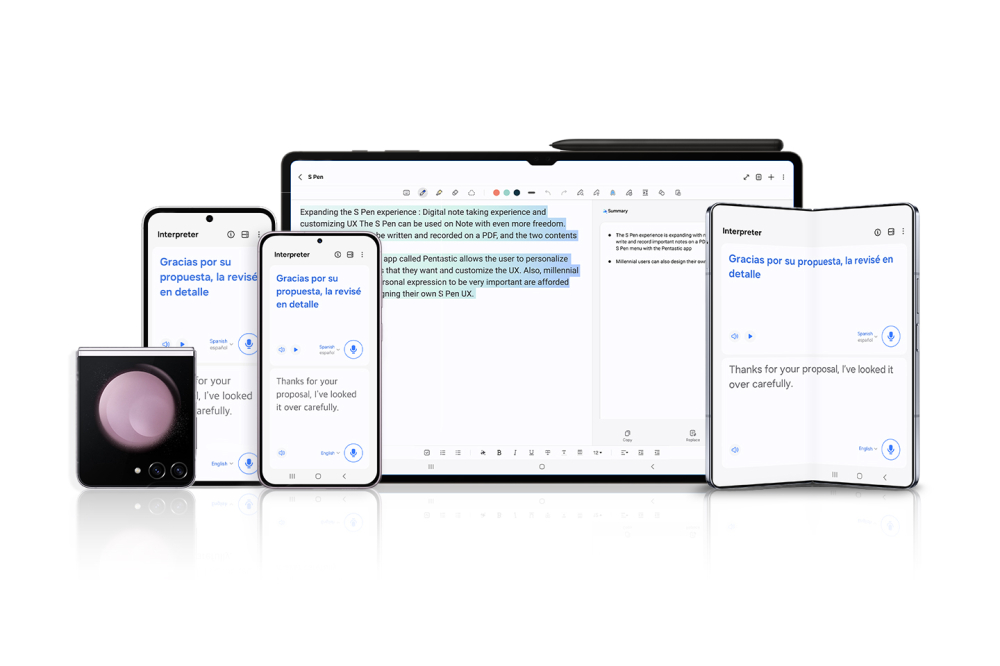
2024년 2월 22일 발표입니다. 갤럭시 S23 시리즈, S23 FE, Z 폴드5, Z 플립5, 탭 S9 시리즈 등 9개 모델에 3월 말부터 One UI 6.1 업데이트를 진행한다고 했습니다.
실시간 통역, 채팅 어시스트, 생성형 편집, 편집 제안, 생성형 배경화면이 들어갑니다. 인스턴트 슬로모는 S23 FE에서 빠졌습니다.
S22·Z 폴드4·Z 플립4 세대 — 2024년 5월 초부터
2024년 4월 15일 발표는 갤럭시 S22 시리즈, Z 플립4·Z 폴드4, 탭 S8 시리즈가 대상입니다.
실시간 통역, 채팅 어시스트, 서클 투 서치, 노트 어시스트, 생성형 편집 등을 쓸 수 있다고 했습니다. 모델별 세부 지원 기능은 다를 수 있다는 단서도 달았습니다.
이번에 확인한 두 발표에 그보다 오래된 기종은 들어 있지 않습니다.
같은 세대 안에서도 기능별로 차이가 있습니다. 삼성은 FAQ에 "특정 Galaxy AI 기능 사용 여부는 지역 및 모델에 따라 다를 수 있습니다"라고 적었습니다.
무료는 '기본 기능'까지
삼성은 갤럭시 기기의 갤럭시 AI 기본 기능을 무료로 제공한다고 밝혔습니다.
기본 기능이 무엇인지도 정해 두었습니다. 삼성 서비스 이용 약관의 'Advanced Intelligence' 항목에 나열된 서비스입니다.
단서는 두 개입니다.
앞으로 출시되는 향상된 기능이나 새 서비스는 유료일 수 있다는 것. 그리고 제3자가 제공하는 AI 기능에는 다른 조건이 적용될 수 있다는 것입니다.
갤럭시에서 쓰는 다른 회사의 AI가 유료인지는 그 회사의 조건을 따로 봐야 한다는 뜻입니다.
일부 지역에서는 AI 이용 연령 제한이 있어 미성년자에게 서비스가 제한될 수 있다는 안내도 있습니다.
무료 기능이라도 쓰려면 갖춰야 할 조건이 있습니다. 삼성 갤럭시 AI 페이지의 각주를 기능별로 모으면 세 갈래로 나뉩니다.
- 인터넷 연결과 삼성 계정이 함께 필요 — 포토 어시스트, 크리에이티브 스튜디오, 텍스트 변환 어시스트의 변환·요약, 글쓰기 어시스트, 빅스비
- 삼성 계정이 필요 — 통역, Now brief, Now nudge, 마이 팬캠, 오디오 지우개
- 직접 켜야 함 — 통화 스크리닝
언어도 기능마다 다릅니다.
2026년 3월 기준 포토 어시스트·크리에이티브 스튜디오·글쓰기 지원은 41개 언어, 통역·텍스트 변환·통화 중 실시간 번역은 22개 언어, Now brief·Now nudge·통화 스크리닝은 13개 언어를 지원합니다. 한국어는 모두에 들어 있습니다.
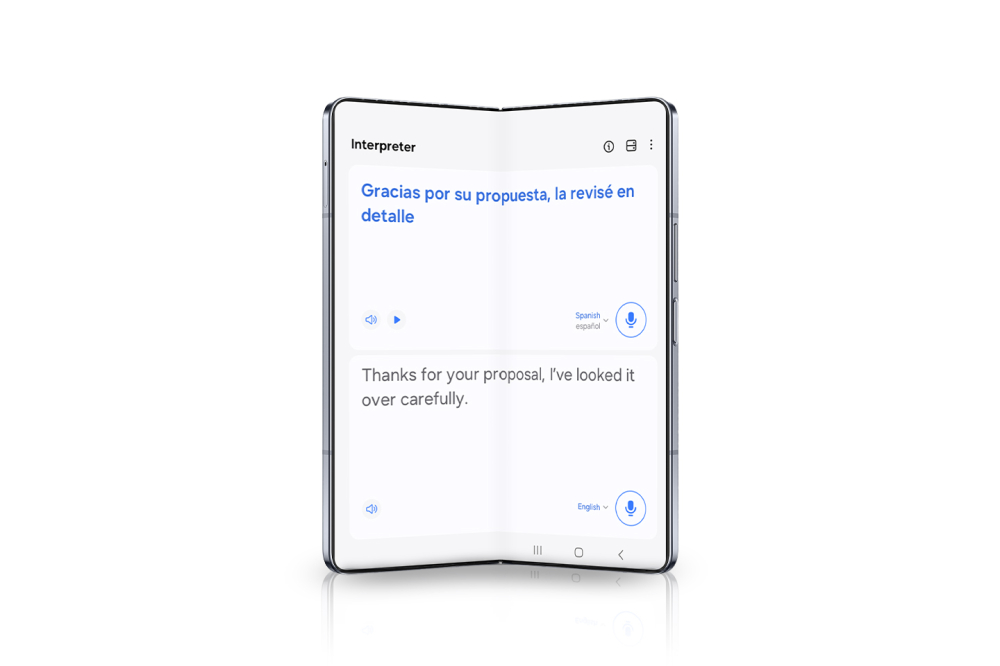
통역은 계정 말고도 언어 팩이 필요할 수 있는 기능입니다. 갤럭시 버즈로 들으려면 폰에서 통역 앱을 열고 버즈를 귀에 낀 뒤, 화면의 마이크 아이콘을 누르면 됩니다.
듣기 모드에서는 화면 아래에 마이크 아이콘이 하나, 대화 모드에서는 두 언어의 마이크 아이콘이 나옵니다.
통역된 음성은 버즈로 듣고, 글자는 폰 화면에서 함께 읽습니다.
내 데이터를 폰 안에만 두고 싶다면
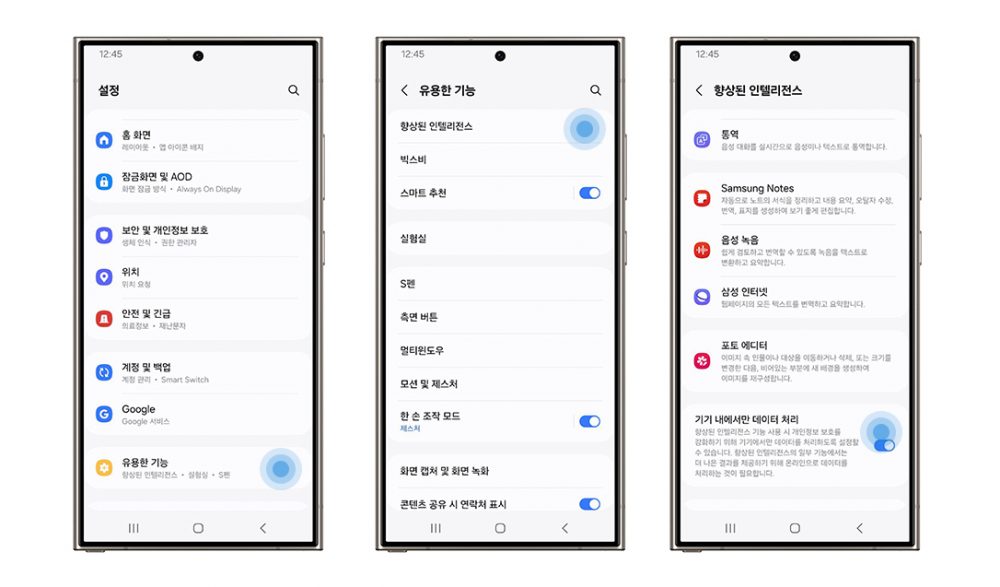
갤럭시 AI 데이터를 기기 안에서 처리할지 클라우드에서 처리할지는 사용자가 고를 수 있습니다.
삼성전자 뉴스룸이 2024년 5월에 안내한 경로는 설정 → 유용한 기능 → 향상된 인텔리전스 → '기기 내에서만 데이터 처리'입니다.
지원 여부는 모델, 소프트웨어 버전, 지역에 따라 다르다고 했으니 메뉴 위치도 기기마다 다를 수 있습니다.
켜면 무엇이 달라질까요?
삼성은 이 설정으로 AI 기능의 온라인 처리 허용 여부를 정한다고 설명했습니다.
2025년 9월 뉴스룸 글은 생성형 편집을 예로 들었습니다. 기본적으로 클라우드에서 실행되지만, 원하면 온디바이스 AI를 고를 수 있다는 것입니다.
그러니 위에서 인터넷 연결이 필요하다고 적힌 기능은 이 설정의 영향을 받을 수 있다는 점을 알고 켜는 게 좋습니다.
학습에 쓰이는지도 적혀 있습니다. 삼성은 어떤 기능과 설정을 사용하더라도 사용자의 개인 데이터는 장기간 저장되거나 AI 학습에 사용되지 않는다고 밝혔습니다.
AI로 고친 사진에는 표시가 남습니다. 포토 어시스트의 생성형 편집으로 고친 사진은 저장할 때 워터마크가 덧씌워집니다.
2025년 9월 뉴스룸 글은 여기에 C2PA 표준에 따른 보이지 않는 메타데이터도 들어간다고 적었습니다. 편집하면 사진 크기가 조정될 수 있다는 안내도 있습니다.
결국 확인할 것은 셋입니다. 기종, 삼성 계정, 처리 위치.
S24 이후 기종이면 공식 지원 대상이고, 그 이전 기종이면 2024년 업데이트에서 어떤 기능을 받았는지부터 봅니다.
결과물은 한 번 더 확인하는 게 좋습니다. 삼성은 AI 기능 결과의 정확성, 완성도, 신뢰성을 보장하지 않는다고 적었습니다.
Officially, Galaxy AI is supported on smartphones released from the Galaxy S24 series onward.
Basic features are free. But Samsung says enhanced features or new services launched later may be paid.
Most of the features Samsung lists require signing in to a Samsung account, and many - photo editing and writing among them - also need an internet connection.
On Naver's Q&A service, a search for 'Galaxy AI' returns more than 14,000 questions as of October 5, and 'Galaxy AI features' 5,761.
Older than an S24 - no luck?
Going by the FAQ alone, yes.
The FAQ on Samsung's Galaxy AI page says Galaxy AI is supported from smartphones released after the S24 series.
Yet Samsung Newsroom twice announced bringing Galaxy AI to earlier models.
Read together, the answer is less 'no' than 'it depends on what each model received.'
S23, Z Fold5, Z Flip5 generation - from late March 2024
This was a February 22, 2024 announcement: nine models - the Galaxy S23 series, S23 FE, Z Fold5, Z Flip5 and Tab S9 series - would get the One UI 6.1 update from late March.
It brings Live Translate, Chat Assist, Generative Edit, Edit Suggestion and generative wallpaper. Instant Slow-mo was left out on the S23 FE.
S22, Z Fold4, Z Flip4 generation - from early May 2024
An April 15, 2024 announcement covered the Galaxy S22 series, Z Flip4 and Z Fold4, and Tab S8 series.
It listed Live Translate, Chat Assist, Circle to Search, Note Assist and Generative Edit among others, with the caveat that supported features may vary by model.
Older models were not in either announcement checked for this article.
Even within a generation features differ. Samsung's FAQ notes that availability of specific Galaxy AI features may vary by region and model.
Free means the basic features
Samsung says it provides the basic Galaxy AI features on Galaxy devices for free.
It also defines them: the services listed under 'Advanced Intelligence' in the Samsung service terms.
There are two caveats.
Enhanced features or new services released later may be paid. And AI features from third parties may come with different terms.
Whether another company's AI on a Galaxy phone costs money depends on that company's terms.
Samsung also notes that age limits on AI use in some regions may restrict Galaxy AI for minors.
Even free features come with conditions. Grouping the footnotes on Samsung's Galaxy AI page by feature gives three kinds.
- Internet connection plus Samsung account - Photo Assist, Creative Studio, transcription and summaries in Transcript Assist, Writing Assist, Bixby
- Samsung account - Interpreter, Now Brief, Now Nudge, My Fancam, Audio Eraser
- Must be switched on manually - Call Screening
Languages differ too.
As of March 2026, Photo Assist, Creative Studio and writing support cover 41 languages; Interpreter, transcription and in-call live translation 22; Now Brief, Now Nudge and Call Screening 13. Korean is in every list.
Interpreter may need a language pack on top of the account. To hear it through Galaxy Buds, open the Interpreter app on the phone, put the Buds in, and tap the microphone icon on screen.
Listening mode shows one microphone icon at the bottom; conversation mode shows one for each of the two languages.
You hear the interpretation through the Buds and read the text on the phone at the same time.
If you want your data to stay on the phone
You can choose whether Galaxy AI data is processed on the device or in the cloud.
The path Samsung Newsroom gave in May 2024 is Settings > Useful features > Advanced Intelligence > 'Process data only on device' (menu names translated from the Korean screen).
Samsung says support varies by model, software version and region, so the menu location may differ.
What changes when you turn it on?
Samsung describes the setting as deciding whether AI features may be processed online.
A September 2025 Newsroom piece uses Generative Edit as the example: it runs in the cloud by default, but you can choose on-device AI.
So features listed above as needing an internet connection may be affected by this setting - worth knowing before you switch it on.
Training is addressed too. Samsung says that whatever features and settings you use, personal data is not stored long-term or used to train AI.
AI-edited photos carry a mark. Photos changed with Generative Edit in Photo Assist get a watermark overlaid when saved.
The September 2025 Newsroom piece adds that invisible metadata following the C2PA standard is included as well, and editing may resize the photo.
In the end there are three things to check: the model, the Samsung account, where data is processed.
An S24 or later is officially supported; for older models, first see which features the 2024 updates brought.
Double-check results, too. Samsung says it does not guarantee the accuracy, completeness or reliability of AI feature results.