AI 를 쓰다 보면 한도에 걸립니다. 그런데 걸린 뒤에 벌어지는 일은 세 서비스가 다 다릅니다.
공식 도움말을 나란히 놓고 보면 이렇습니다. 한 곳은 성능을 낮춰서라도 계속 쓰게 하고, 한 곳은 여러 제품이 한 통장을 나눠 쓰며, 한 곳은 추가로 산 크레딧을 일반 대화에 쓸 수 없습니다.
가장 먼저 알아둘 것은 챗GPT 크레딧입니다. 돈을 더 내도 일반 챗GPT 대화 한도가 늘지는 않습니다.
■ 제미나이 — 5시간마다 풀린다
제미나이의 한도는 컴퓨팅을 기준으로 합니다. 프롬프트의 복잡성과 쓰는 모델·기능, 채팅 길이를 함께 봅니다.
갱신 주기가 특이합니다. 주간 한도에 도달할 때까지 5시간마다 갱신됩니다. 하루 단위가 아니라는 뜻입니다.
걸렸을 때는 어떻게 될까요? 구독 중이라면 Flash-Lite 로 대화를 이어갈 수 있습니다. 더 높은 한도의 요금제로 올리거나, 초기화될 때까지 기다리는 선택지도 함께 안내합니다.
한도는 사전 고지 없이 바뀔 수 있다고 밝혀 두었습니다. 이용이 몰리면 품질을 지키려고 조정되는데, 그때 요금제를 쓰지 않는 사용자의 한도가 먼저 제한될 수 있다고 적었습니다.
■ 클로드 — 통장이 하나다
클로드는 한도가 두 종류입니다. 얼마나 많이 쓸 수 있는지를 정하는 사용량 한도, 그리고 한 대화에 얼마나 담을 수 있는지를 정하는 길이 한도입니다.
사용량 쪽에 중요한 대목이 있습니다. claude.ai 와 클로드 코드, 클로드 데스크톱에서 쓴 것이 모두 같은 한도로 합산됩니다. 사용량 번들 잔액도 클로드와 데스크톱, 모바일, 코드, 코워크에 걸쳐 하나의 통장으로 쓰입니다.
길이 한도는 컨텍스트 창입니다. 유료 요금제의 최신 모델은 100만 토큰까지 지원하고 그 밖에는 50만 또는 20만 토큰입니다. 응답용으로 일부가 늘 예약돼 있어, 실제로 쓸 수 있는 대화 길이는 창 전체보다 조금 작습니다.
코드 실행이 켜져 있으면 자동 컨텍스트 관리가 돕니다. 대화가 한계에 가까워지면 앞부분을 요약해 이어가고, 전체 기록은 그대로 보존됩니다. 대화 중에 생각을 정리하고 있다는 표시가 보이면 이 기능이 도는 중입니다.
다만 대가가 붙습니다. 자동 컨텍스트 관리가 도는 긴 대화는 사용량을 더 많이 씁니다. 한도가 가까워졌다면 새 대화를 시작하는 편이 낫다고 도움말이 권합니다.
■ 챗GPT — 크레딧을 쓸 곳이 정해져 있다
챗GPT 는 플랜에 포함된 한도를 다 쓴 뒤 크레딧을 사서 이어 쓰는 방식입니다. 요금제를 올리지 않아도 됩니다.
그런데 쓰이는 곳이 정해져 있습니다. 현재 크레딧은 코덱스와 챗GPT 워크, 챗GPT 포 엑셀에서만 쓸 수 있습니다. 일반 챗GPT 대화 한도를 늘리는 용도가 아닙니다.
헷갈리기 쉬운 것이 하나 더 있습니다. 사용량 크레딧과 챗GPT 지갑은 별개입니다. 지갑은 기프트카드를 등록해 채울 수 있는 달러 잔액인데, 기프트카드를 넣는다고 사용량 크레딧이 생기지는 않습니다.
결제 화면에 지갑 잔액이 보인다고 해서 그 돈이 모든 크레딧 구매에 쓰이는 것도 아닙니다. 결제 전에 지갑에서 얼마가 적용됐고 남은 청구액이 얼마인지 확인하라고 안내합니다.
잔액이 마이너스가 될 수도 있습니다. 잔액이 남은 상태에서 시작한 작업이 도중에 잔액을 다 쓰고 끝나는 경우인데, 이때는 나중에 산 크레딧이 먼저 마이너스를 메웁니다.
자동 충전을 켜두면 잔액이 정해둔 최소치 아래로 내려갈 때 목표 잔액까지만 자동으로 삽니다. 켜는 순간 이미 최소치 아래라면 바로 결제될 수 있습니다.
■ 한도를 덜 쓰는 요령
그러면 한도를 아끼는 방법은 없을까요? 클로드 도움말이 구체적입니다.
- 프로젝트를 씁니다 — 프로젝트에 담긴 내용은 캐시돼 다시 쓸 때 한도를 깎지 않습니다
- 프로젝트 지침은 짧게 쓰고, 쓰지 않는 파일은 정리합니다
- 확장 사고가 필요 없는 작업에서는 꺼둡니다
- 일상적인 작업은 effort 수준을 낮춥니다
- 웹 검색과 리서치, MCP 커넥터는 필요 없을 때 꺼둡니다
도구와 커넥터는 토큰을 많이 먹습니다. 안 쓸 때 꺼두는 것이 컨텍스트와 사용량 양쪽에 도움이 된다고 설명합니다.
자주 쓰는 비슷한 프롬프트는 부분적으로 캐시된다고도 밝혔습니다. 메시지 길이와 첨부 파일 크기, 대화 길이, 도구 사용, 모델 선택, effort 수준, 아티팩트 생성이 모두 사용량에 영향을 줍니다.
■ 지금 얼마나 썼는지 보는 곳
제미나이는 gemini.google.com 에서 왼쪽 아래 설정을 열고 사용량 한도를 고르면 됩니다. 한도에 가까워지면 알림이 오고, 도달하면 언제 초기화되는지도 알려줍니다.
챗GPT 는 설정에서 사용량으로 들어가면 크레딧 잔액과 최근 사용량을 볼 수 있습니다. 코덱스 앱에서는 사용량 및 청구 화면입니다.
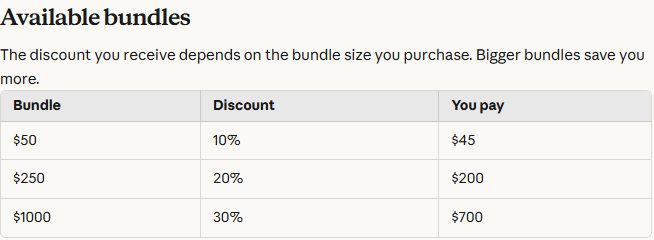
클로드는 사용량 번들을 미리 사두면 표준 요율보다 최대 30% 아낄 수 있습니다. 큰 번들일수록 할인이 큽니다. 프로와 맥스, 팀 요금제에서 살 수 있습니다.
5시간마다 풀리는 곳, 통장이 하나인 곳, 크레딧 쓸 곳이 정해진 곳. 한도라는 같은 말이 세 서비스에서 다르게 작동합니다.
Use AI long enough and you hit a limit. What happens after you hit it differs across the three services.
Put the official help centres side by side and it looks like this. One keeps you going by dropping to a lighter model, one pools usage across every product, and one sells credits you cannot spend on ordinary chat.
Start with ChatGPT credits. Paying more does not raise the limit on ordinary ChatGPT conversations.
Gemini: it resets every five hours
Gemini's limits are compute-based, taking into account prompt complexity, the model and features in use, and the length of the chat.
The reset cycle is unusual. It refreshes every five hours until you reach the weekly limit — not on a daily cycle.
And when you hit it? Subscribers can carry on with Flash-Lite. The guidance also offers upgrading to a plan with higher limits, or simply waiting for the reset.
Google states that limits may change without notice. When activity surges they may be adjusted to maintain quality, and it notes that users without a paid plan may be limited first.
Claude: one shared balance
Claude has two kinds of limit: usage limits, which govern how much you can do, and length limits, which govern how much fits in one conversation.
One point matters on the usage side. What you use on claude.ai, Claude Code and Claude Desktop all counts toward the same limit. A usage bundle balance is likewise a single pool across Claude, Desktop, mobile, Code and Cowork.
The length limit is the context window. On paid plans the newest models support up to 1M tokens, others 500K or 200K. Part of the window is always reserved for Claude's response, so the longest possible conversation is slightly smaller than the window.
With code execution enabled, automatic context management kicks in. As a conversation nears the limit, earlier messages are summarised so it can continue, and the full history is preserved. If you see Claude organising its thoughts, that is this feature running.
There is a cost. Longer conversations that trigger automatic context management consume more of your usage limit, so the guidance suggests starting a new conversation if you are close to it.
ChatGPT: credits only work in certain places
ChatGPT lets you buy credits to continue after your plan's included usage runs out, without upgrading the plan.
But they only apply in certain places. Credits currently work with Codex, ChatGPT Work and ChatGPT for Excel. They are not a way to extend ordinary ChatGPT conversations.
One more thing is easy to confuse. Usage credits and the ChatGPT wallet are separate. The wallet is a dollar balance that can include redeemed gift-card funds, and redeeming a gift card does not itself add usage credits.
Nor does a visible wallet balance mean those funds apply to every credit purchase. The guidance says to check how much of the wallet was applied and what remains due before confirming.
The balance can also go negative. If a task starts while your balance is positive but finishes after concurrent usage depletes it, later purchases may first offset the negative balance.
With automatic reload on, a purchase is made only for the amount needed to return to your target balance once you drop below your chosen minimum. If you are already below it when you switch it on, a purchase may happen right away.
How to spend less of it
So is there a way to stretch a limit? Claude's guidance is the most specific.
- Use projects — content in projects is cached and does not count against limits when reused
- Keep project instructions short and clear out files you no longer use
- Turn off extended thinking when a task does not need it
- Lower the effort level for routine work
- Disable web search, Research and MCP connectors when they are not needed
Tools and connectors are token-intensive. Turning them off when unused helps both the context window and the usage limit.
Similar prompts you use frequently are partially cached. Message length, file attachment size, conversation length, tool usage, model choice, effort level and artifact creation all affect usage.
Where to check what you have used
In Gemini, open Settings at the bottom left of gemini.google.com and choose usage limits. It warns you as you approach a limit and tells you when it resets once you hit one.
In ChatGPT, Settings then Usage shows your credit balance and recent usage. In the Codex app it is Usage & Billing.
For Claude, buying usage bundles in advance saves up to 30% against standard rates, with bigger bundles saving more. They are available on Pro, Max and Team plans.
One resets every five hours, one shares a single balance, one restricts where credits work. The same word behaves differently in all three.