


마이크로소프트 코파일럿은 copilot.cloud.microsoft와 앱, Edge에서 무료로 쓸 수 있습니다. 질문·글쓰기·요약, 웹 검색 기반 답변, 이미지 만들기까지 됩니다.
워드·엑셀·파워포인트 같은 Microsoft 365 데스크톱 앱 안의 코파일럿은 다릅니다. Personal·Family·Premium 같은 개인 구독이 필요하고, 그중에서도 구독 소유자만 쓸 수 있습니다.
네이버 지식iN에서 '코파일럿'으로 검색되는 질문이 10월 5일 기준 1,557건입니다.
무료 코파일럿으로 되는 것
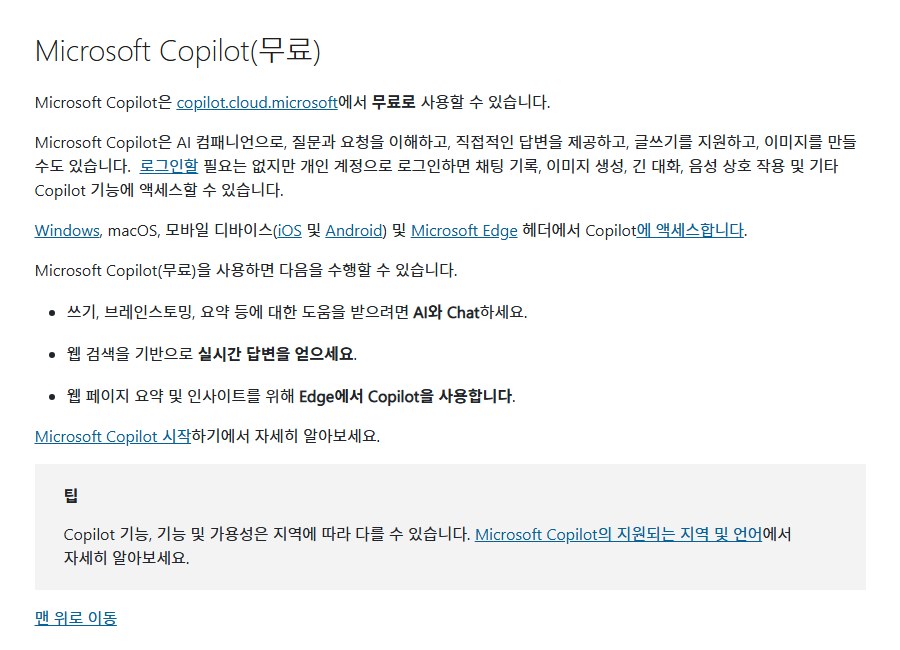
무료 버전은 copilot.cloud.microsoft에서 웹 브라우저로 쓰거나, 윈도우·macOS·iOS·안드로이드 앱을 받거나, Edge의 코파일럿에서 바로 씁니다.
마이크로소프트가 든 무료 기능은 셋입니다. 글쓰기·브레인스토밍·요약을 돕는 채팅, 웹 검색 기반의 실시간 답변, Edge에서 보는 웹페이지 요약입니다.
로그인하지 않아도 쓸 수 있습니다. 다만 개인 계정으로 로그인해야 채팅 기록, 이미지 생성, 긴 대화, 음성 대화 같은 기능을 쓸 수 있다고 지원 문서는 적었습니다.
기능과 가용성은 지역에 따라 다를 수 있다는 단서도 붙어 있습니다.
구독하면 달라지는 것
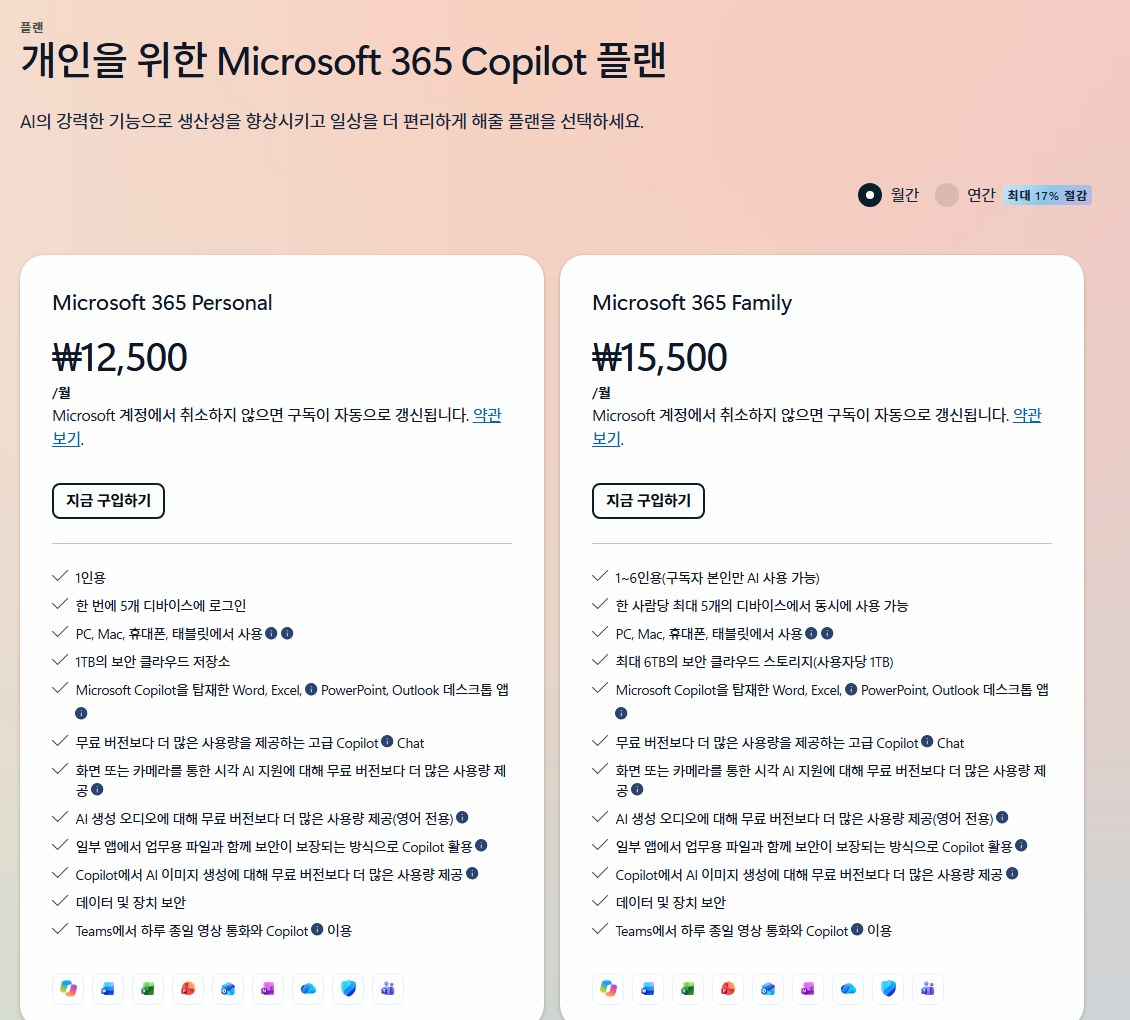
10월 5일 마이크로소프트 한국 요금 페이지 기준 월간 결제 요금은 이렇습니다. 연간 결제는 최대 17% 저렴하다고 적혀 있습니다.
- Microsoft 365 Personal — 월 ₩12,500, 1인
- Microsoft 365 Family — 월 ₩15,500, 1~6인(AI는 구독자 본인만)
- Microsoft 365 Premium — 월 ₩29,000
- Microsoft 365 Pro — 월 ₩149,000, 월간 결제만
가장 큰 차이는 앱 안의 코파일럿입니다. 구독 소유자는 워드, 엑셀, 파워포인트, 아웃룩, 원노트 데스크톱 앱에서 코파일럿을 쓸 수 있고, AI 사용 제한이 적용됩니다.
사용량도 늘어납니다. Personal과 Family 요금제 설명에는 고급 코파일럿 채팅, 화면·카메라를 통한 시각 AI 지원, AI 이미지 생성을 무료 버전보다 더 많이 쓸 수 있다고 적혀 있습니다. AI 생성 오디오도 늘지만 영어 전용입니다.
Premium은 여기에 리서치·분석 같은 에이전트와 더 넓은 사용 허용량을 더합니다.
가족 구독을 나눠 쓴다면
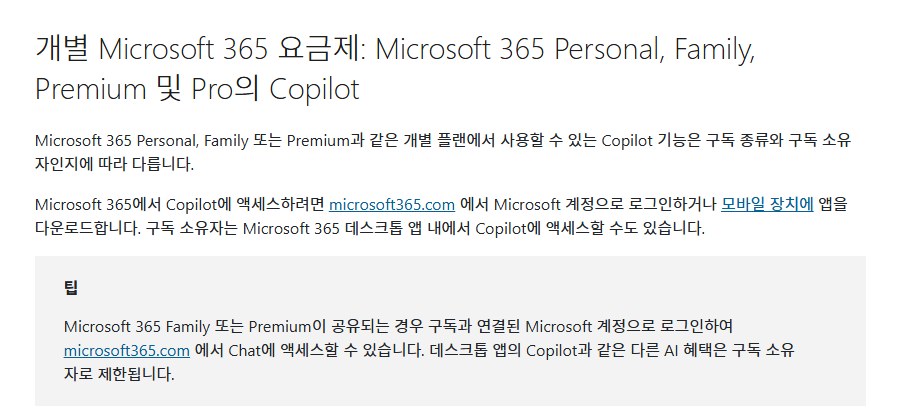
Family나 Premium을 가족과 나눠 쓰는 경우가 많습니다. 이때 AI 혜택은 나뉘지 않습니다.
공유받은 구성원도 구독에 연결된 Microsoft 계정으로 microsoft365.com에 로그인하면 Chat은 쓸 수 있습니다. 하지만 데스크톱 앱의 코파일럿 같은 다른 AI 혜택은 구독 소유자에게만 주어진다고 지원 문서는 적었습니다.
요금 페이지도 Family와 Premium을 '1~6인용(구독자 본인만 AI 사용 가능)'으로 표시합니다.
회사 계정은 또 다릅니다. 요건을 갖춘 Microsoft 365 비즈니스 라이선스가 있으면 Copilot Chat이 자동으로 포함되고, 그 밖의 추가 기능은 관리자가 배정한 라이선스에 따라 달라집니다.
결국 확인할 것은 둘입니다. 웹 채팅만 필요한지, 워드·엑셀 안에서 써야 하는지. 앞의 것은 무료로 충분하고, 뒤의 것은 구독 소유자여야 합니다.
Microsoft Copilot is free at copilot.cloud.microsoft, in its apps and in Edge, covering questions, writing and summaries, web-grounded answers and even image creation.
Copilot inside Microsoft 365 desktop apps like Word, Excel and PowerPoint is different: it needs an individual subscription such as Personal, Family or Premium, and only the subscription owner can use it.
On Naver's Q&A service, a search for 'Copilot' returns 1,557 questions as of October 5.
What free Copilot does
Use the free version in a browser at copilot.cloud.microsoft, in apps for Windows, macOS, iOS and Android, or directly in Edge.
Microsoft lists three free capabilities: chat for writing, brainstorming and summaries; real-time answers based on web search; and web page summaries in Edge.
You don't need to sign in, but signing in with a personal account unlocks chat history, image generation, longer conversations, voice interaction and other features, the support page says.
It also notes that features and availability may vary by region.
What a subscription changes
Monthly prices on Microsoft's Korean pricing page as of October 5 are below; annual billing saves up to 17%, it says.
- Microsoft 365 Personal - 12,500 won a month, one person
- Microsoft 365 Family - 15,500 won a month, 1-6 people (AI for the subscriber only)
- Microsoft 365 Premium - 29,000 won a month
- Microsoft 365 Pro - 149,000 won a month, monthly billing only
The biggest difference is Copilot in the apps: subscription owners can use it in the Word, Excel, PowerPoint, Outlook and OneNote desktop apps, with AI usage limits.
Usage rises too. The Personal and Family plan descriptions list more advanced Copilot chat, visual AI help through the screen or camera, and AI image generation than the free version; AI-generated audio also rises but is English only.
Premium adds agents such as Researcher and Analyst and a larger usage allowance.
If you share a family subscription
Many people share Family or Premium with relatives. The AI benefits are not shared, though.
Shared members can sign in at microsoft365.com with the Microsoft account linked to the subscription and use Chat, but other AI benefits such as Copilot in the desktop apps are limited to the subscription owner, the support page says.
The pricing page likewise labels Family and Premium as for 1-6 people, with AI for the subscriber only.
Work accounts differ again: eligible Microsoft 365 business licenses include Copilot Chat automatically, and anything more depends on the licenses an admin assigns.
In the end, ask one question: do you only need web chat, or Copilot inside Word and Excel? The first is covered by the free version; the second requires being the subscription owner.