아이에게 AI 를 쓰게 할 때 부모가 켤 수 있는 것은 서비스마다 다릅니다.
세 곳의 공식 도움말을 나란히 놓고 보면 접근 자체가 갈립니다. 한 곳은 부모가 설정을 관리하게 하고, 한 곳은 보호자 계정으로 연결하며, 한 곳은 미성년자를 아예 받지 않습니다.
클로드는 만 18세 미만이 쓸 수 없습니다. 자녀 보호 기능이 없는 것이 아니라, 계정을 만들 수 없습니다.
■ 챗GPT — 계정을 잇고 시간을 정한다
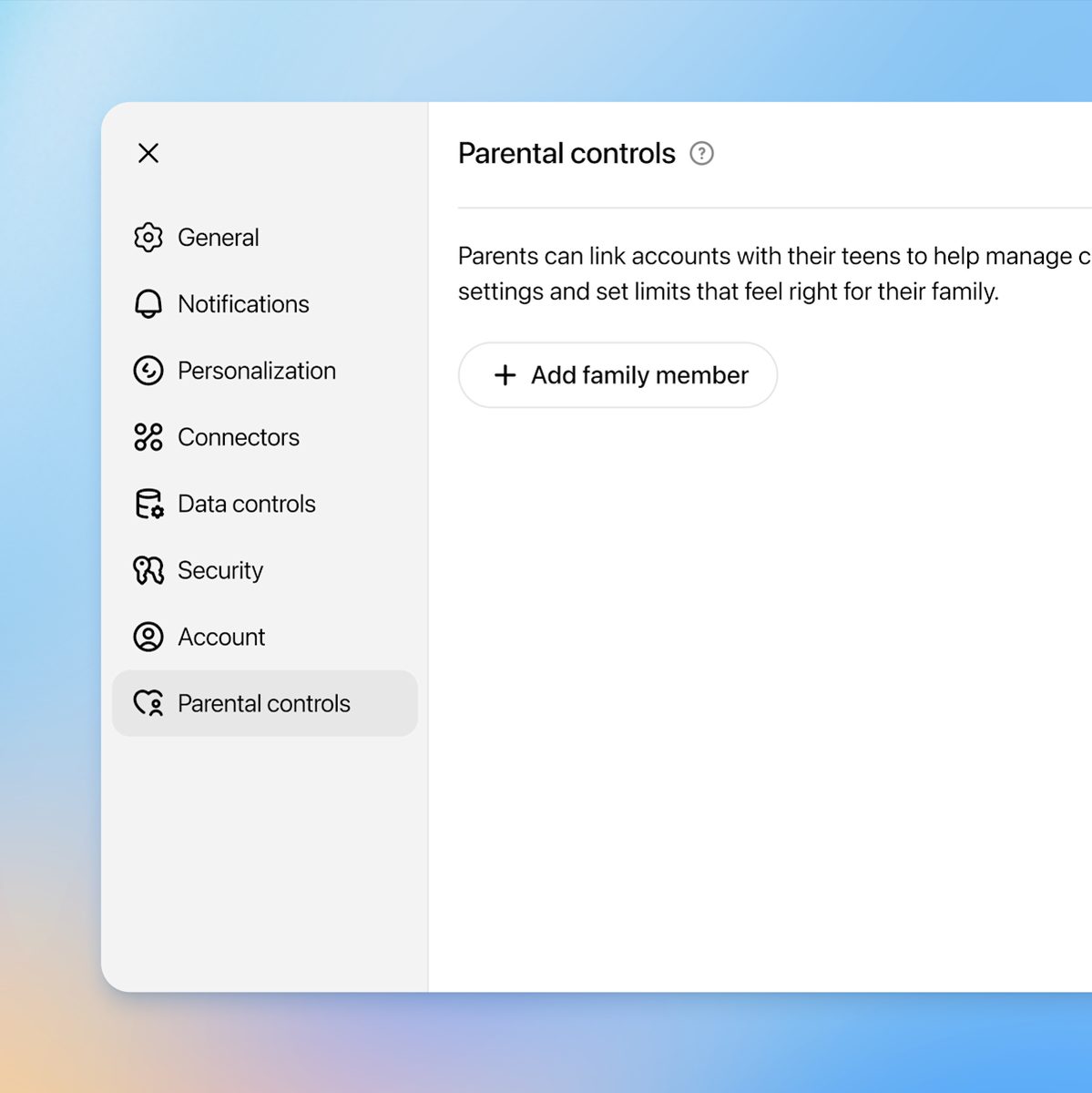
부모가 자녀 계정과 연결해 설정을 관리하는 방식입니다. 웹에서는 이렇게 초대합니다.
- 프로필 메뉴에서 설정을 엽니다
- 자녀 보호 기능(Parental controls)을 고릅니다
- 가족 구성원 추가(Add family member)를 고릅니다
- 전화번호 또는 이메일을 선택하고 보냅니다
자녀 쪽에서 먼저 부모를 초대할 수도 있습니다. 설정에서 자녀 보호 기능으로 들어가 부모 초대를 고르면 됩니다. 부모 한 명이 여러 자녀와 연결할 수 있지만, 자녀는 한 번에 한 명하고만 연결됩니다.
■ 무엇을 켜고 끌 수 있나
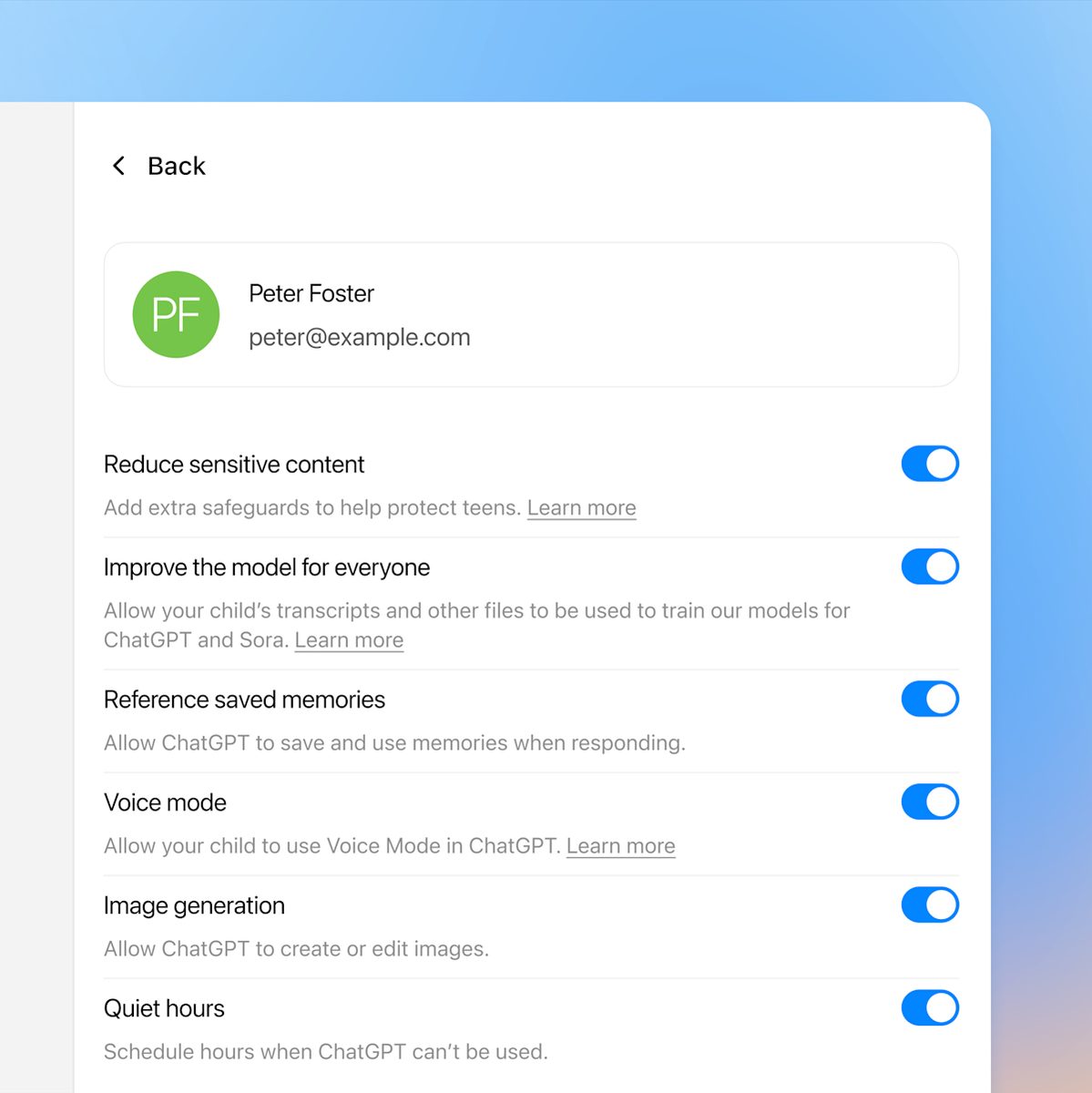
연결한 뒤 가족 구성원에서 자녀를 고르면 관리 항목이 나옵니다.
- 민감한 콘텐츠 줄이기 — 연령에 맞지 않는 내용에 안전장치를 더합니다
- 이미지 생성 — 이미지를 만들고 고치는 기능을 열지 닫을지 정합니다
- 학습 시간 — 정해둔 시간대에 새 대화가 학습 모드로 시작됩니다
- 조용한 시간 — 그 시간대에는 챗GPT 를 쓸 수 없습니다
두 시간 설정은 어떻게 다를까요? 성격이 반대입니다. 조용한 시간은 사용 자체를 막고, 여러 구간을 넣을 수 있습니다.
학습 시간은 막지 않습니다. 접근을 제한하지 않고 새 대화가 학습 모드로 시작될 뿐입니다. 기본은 꺼져 있고, GPT 나 프로젝트 대화에는 적용되지 않습니다.
설정을 끄면 해당 기능이 숨겨지거나 막히고, 계정이 연결돼 있는 동안 자녀는 부모가 관리하는 설정을 바꿀 수 없습니다.
■ 대화는 볼 수 없다
여기서 부모가 오해하기 쉬운 대목이 있습니다. 계정을 연결해도 자녀의 대화나 대화 기록, 실시간 활동은 볼 수 없습니다.
안전 알림이 오는 경우가 있지만 심각한 우려에 한정되고, 알림에도 대화 내용이나 기록은 들어 있지 않습니다. 오픈AI 는 이것이 실시간 감시가 아니며 모든 우려를 짚어내지도, 전문적인 치료나 응급 서비스를 대신하지도 않는다고 밝혔습니다.
심각한 자해 우려는 별도로 훈련받은 검토자가 평가한 뒤 알림이 발송됩니다. 연결 해제는 부모든 자녀든 언제든 할 수 있습니다.
계정을 연결하지 않아도 적용되는 것이 있습니다. 챗GPT 는 여러 신호로 18세 미만 계정을 예측하고, 해당되면 청소년 환경을 자동으로 적용합니다. 이 경우 광고는 표시되지 않습니다. 18세 이상인데 잘못 분류됐다면 연령을 인증해 해제할 수 있습니다.
■ 제미나이 — 13세 미만은 패밀리 링크로
제미나이는 접근 권한을 주는 쪽입니다. 만 13세 미만 자녀에게 권한을 줄 수 있고, 사용 설정과 중지는 구글 패밀리 링크에서 관리합니다.
미성년자에게는 필터가 더 붙습니다. 제미나이가 스스로 사람이라고 말하거나 인간적인 감정을 가졌다고 주장하지 못하게 하고, 유해한 캐릭터로 역할극을 하지 못하도록 막습니다.
제약도 있습니다. 만 13세 미만은 활동 기록 보관 설정을 쓸 수 없고, 음성 호출과 보이스 매치도 쓸 수 없습니다. 유럽 경제 지역과 스위스, 영국의 감독 대상 계정에서는 제미나이 앱 자체를 쓸 수 없습니다.
켜도 바로 안 될 수 있습니다. 감독 대상 계정의 제미나이 접근은 점진적으로 출시 중이라, 패밀리 링크에서 사용 설정을 해도 자녀가 아직 접근하지 못할 수 있다고 안내합니다.
■ 클로드 — 만 18세 미만은 못 쓴다
클로드는 방향이 다릅니다. 소비자용 클로드는 만 18세 이상만 쓸 수 있고, 계정을 만들 때 18세 이상임을 확인해야 합니다. 미성년으로 보이는 정황이 감지되면 연령 확인을 요구하고, 미성년 활동 지표가 있으면 계정을 비활성화합니다.
그러면 확인은 어떻게 할까요? 요티라는 외부 업체를 거칩니다. 셀피로 나이를 추정하거나, 신분증 사진을 올리거나, 요티 디지털 ID 앱에서 성인 여부만 공유하는 방법이 있습니다.
요티는 확인이 끝나는 즉시 셀피와 서류 이미지를 삭제하고, 앤트로픽은 통과와 실패 결과만 받는다고 밝혔습니다.
앱스토어 쪽에서 막히는 경우도 있습니다. 미국 일부 주의 새 법에 따라 앱스토어가 이용자 연령을 확인해 개발자에게 전달하는데, 여기서 18세 미만으로 확인되면 로그인이 되지 않습니다. 앤트로픽은 앱스토어 계정 정보에 접근할 수 없어, 연령이 잘못돼 있다면 애플이나 구글 플레이 쪽에 문의해야 합니다.
■ 세 곳이 똑같이 적어둔 것
그러면 설정을 다 켜면 안심해도 될까요? 세 문서 모두 같은 단서를 답니다.
구글은 필터가 부적절한 콘텐츠를 완벽하게 차단하지는 못하며, 보호자가 보여 주고 싶지 않은 콘텐츠를 자녀가 접할 수 있다고 적었습니다. 오픈AI 의 안전 알림 역시 모든 우려를 식별하지는 못한다고 안내합니다.
구글은 한 가지를 덧붙였습니다. 자녀에게 제미나이를 친구로 여기거나 개인적인 문제나 비밀을 논의하는 데 써서는 안 된다고 알려주라는 것입니다. 주소나 학교 이름, 가족 정보 같은 민감한 개인 정보를 채팅에 넣지 말라는 안내도 함께 있습니다.
부모가 켜는 설정과 아이에게 해두는 말. 세 곳 도움말이 공통으로 가리키는 것은 이 둘입니다.
What a parent can switch on differs by service.
Put the three official help centres side by side and the approaches diverge. One lets a parent manage settings, one grants access through a guardian account, and one does not admit minors at all.
Claude is unavailable to anyone under 18. It is not that parental controls are missing — an account cannot be created.
ChatGPT: link the accounts, then set the hours
A parent links to the teen's account and manages settings. On the web, the invitation goes like this.
- Open Settings from your profile menu
- Select Parental controls
- Select Add family member
- Choose phone or email, then send
A teen can invite first instead, choosing Invite a parent under Parental controls. One parent can link with several teens; each teen links to only one parent at a time.
What can be turned on and off
Once linked, select the teen under Family members to see the controls.
- Reduce sensitive content — adds safeguards against age-inappropriate material
- Image generation — controls whether the teen can create and edit images
- Study hours — new conversations start in study mode during set times
- Quiet hours — ChatGPT cannot be used during those times
How do the two time settings differ? They work in opposite directions. Quiet hours block use outright, and more than one block can be added.
Study hours block nothing. They do not restrict access; eligible new conversations simply start in study mode. They are off by default and do not apply to GPT or Project conversations.
Turning a setting off hides or blocks that feature, and while the accounts are linked the teen cannot change what the parent manages.
You cannot read the conversations
This is where parents most often misread it. Linking does not give access to a teen's conversations, chat history, or real-time activity.
Safety notifications exist but only in limited situations involving serious concern, and they do not include the conversation or transcript. OpenAI says this is not real-time monitoring, may not identify every concern, and does not replace professional care or emergency services.
Serious self-harm concerns are evaluated by specially trained reviewers before a notification is sent. Either person can unlink the accounts at any time.
Something applies even without linking. ChatGPT predicts whether an account belongs to someone under 18 and, if so, applies the teen experience automatically. No ads are shown on such accounts. Anyone 18 or over who is placed there by mistake can verify their age to remove it.
Gemini: under 13 goes through Family Link
Gemini grants access instead. A parent can give access to a child under 13, with enabling and disabling managed through Google Family Link.
Extra filters apply for minors: Gemini is prevented from claiming to be a person, from claiming human feelings, and from role-playing harmful characters.
There are limits. Under-13s cannot use the activity-keeping setting, nor the voice hotword and Voice Match. Supervised accounts in the European Economic Area, Switzerland and the UK cannot use the Gemini app at all.
Switching it on may not be enough. Access for supervised accounts is rolling out gradually, so a child may not have it yet even after it is enabled in Family Link.
Claude: not available under 18
Claude goes the other way. The consumer product is only available to people over 18, and you confirm you are 18 or over when creating an account. Where signals suggest a user may be under 18, Claude asks for verification and disables accounts on indicators of minor activity.
So how is age checked? Through Yoti, a third-party provider. Options are facial age estimation from a selfie, uploading a photo of an ID, or sharing a verified over-18 attribute from the Yoti app.
Yoti deletes the selfie and document images as soon as the check is done, and Anthropic says it receives only a pass or fail result.
The app store can block it too. Under new laws in some US states, app stores verify users' ages and pass that on to developers; if the store reports under 18, sign-in fails. Anthropic cannot see app store account information, so a wrong age has to be fixed with Apple or Google Play.
What all three wrote down
So is everything safe once the settings are on? All three documents attach the same caveat.
Google writes that its filters do not block inappropriate content perfectly and that a child may still encounter material a guardian would rather they did not. OpenAI likewise says its safety notifications may not identify every concern.
Google adds one more thing: tell children not to treat Gemini as a friend or use it to discuss personal problems or secrets, and not to put sensitive details such as an address, school name or family information into the chat.
The settings a parent switches on, and the things said to the child beforehand. Those are the two the three help centres point at together.