파일을 올리려는데 안 올라갈 때가 있습니다. 세 서비스의 한도가 서로 꽤 다르기 때문입니다.

공식 도움말에 적힌 숫자를 한자리에 모았습니다. 파일 하나의 크기, 한 번에 올릴 수 있는 개수, 그리고 각자만 갖고 있는 제약이 갈립니다.

가장 빡빡한 쪽은 무료 챗GPT 입니다. 하루 3개로 제한됩니다.

■ 파일 하나가 얼마나 커도 되나

파일 하나의 크기 상한부터 보겠습니다.

  • 챗GPT — 파일당 512MB. 이미지는 20MB, CSV 와 스프레드시트는 약 50MB 입니다
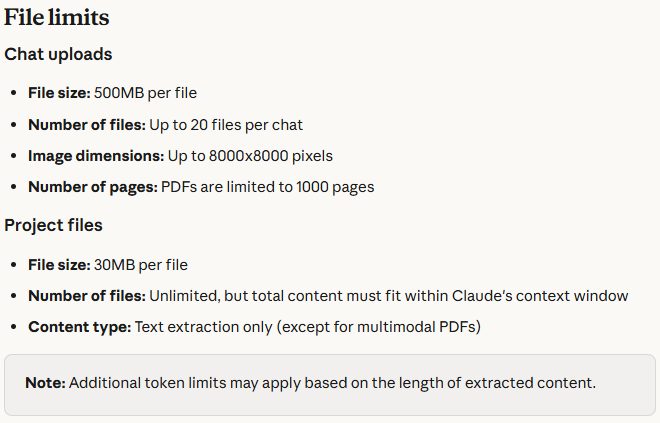
  • 클로드 — 채팅에 올릴 때 파일당 500MB, 프로젝트 파일은 30MB 입니다
  • 제미나이 — 동영상은 하나에 2GB, 그 밖의 형식은 100MB 입니다

크기 말고 다른 상한도 있습니다. 챗GPT 는 텍스트와 문서 파일에 파일당 200만 토큰 상한을 따로 두고 있습니다. 스프레드시트에는 적용되지 않습니다.

저장 총량도 정해져 있습니다. 챗GPT 는 사용자당 25GB, 조직당 100GB 입니다. 이 용량은 채팅과 프로젝트, 맞춤형 GPT 지식이 함께 나눠 씁니다.

■ 한 번에 몇 개까지

개수는 어떨까요? 여기서 차이가 큽니다.

  • 챗GPT — 3시간에 80개. 무료 사용자는 하루 3개입니다
  • 클로드 — 채팅 하나에 최대 20개입니다
  • 제미나이 — 한 프롬프트에 최대 10개입니다

프로젝트 단위로도 갈립니다. 챗GPT 는 플러스가 프로젝트당 20개, 프로와 팀·교육·비즈니스가 40개입니다. 맞춤형 GPT 하나에는 그 GPT 를 쓰는 동안 통틀어 10개까지 넣을 수 있습니다.

클로드 프로젝트는 개수 제한이 없습니다. 대신 전체 내용이 컨텍스트 창 안에 들어가야 합니다.

■ PDF 는 100페이지가 경계다

PDF 를 다룰 때 알아두면 좋은 선이 있습니다. 클로드는 100페이지 이하 PDF 에서만 이미지와 차트 같은 시각 요소까지 분석합니다.

101페이지부터 1000페이지까지는 텍스트만 처리하고 시각 요소는 보지 않습니다. 1000페이지를 넘으면 아예 올라가지 않고, 파일이 너무 크다는 오류가 뜹니다.

PDF 가 아닌 문서에서는 텍스트만 추출합니다. 문서 안에 그림이 박혀 있으면 클로드는 그것을 읽지 못합니다. 프로젝트 파일도 텍스트 추출만 하는데, 멀티모달 PDF 는 예외입니다.

이미지 쪽 제약도 있습니다. 클로드는 최대 8000×8000 픽셀까지 받고, 1000×1000 픽셀 이상을 권합니다.

■ 제미나이는 길이로 잰다

제미나이에는 다른 두 곳에 없는 기준이 있습니다. 동영상과 오디오를 길이로 잽니다.

  • 동영상 — 올릴 수 있는 총 길이가 5분입니다. Google AI Pro 나 Ultra 로 올리면 최대 1시간까지 늘어납니다
  • 오디오 — 총 10분입니다. 업그레이드하면 최대 3시간입니다

코드도 통째로 올릴 수 있습니다. 채팅 하나에 코드 폴더 하나 또는 GitHub 저장소 하나를 넣을 수 있고, 파일 5,000개에 100MB 까지입니다.

ZIP 파일에는 조건이 붙습니다. 안에 최대 10개 파일까지, 크기는 100MB 까지이며 동영상이나 오디오 파일은 넣을 수 없습니다.

■ 안 올라갈 때 볼 것

그러면 파일이 안 올라갈 때는 무엇부터 볼까요?

챗GPT 에서 업로드 한도에 걸렸다는 메시지가 뜬다면, 한도가 두 종류라는 점을 기억하면 됩니다. 3시간에 80개 같은 업로드 속도 제한과 25GB·100GB 같은 저장 용량 제한이 따로 있습니다. 저장 용량은 채팅과 프로젝트, 맞춤형 GPT 지식에 걸쳐 함께 계산됩니다.

저장 사용량은 설정에서 스토리지로 들어가면 볼 수 있습니다. 다만 업로드 속도 할당량을 얼마나 썼는지는 표시되지 않는다고 도움말이 밝혀 두었습니다.

형식 문제일 수도 있습니다. 챗GPT 는 XLSX 와 XLS, CSV, TSV, DOCX, PPTX, PDF, TXT 를 지원하는데 구글 문서 형식인 .gdoc 은 지원하지 않습니다. PDF 나 DOCX 로 내보내 올리라고 안내합니다.

클로드에서 XLSX 가 안 올라간다면 계정에서 코드 실행과 파일 생성을 켰는지 확인하면 됩니다. 이 설정이 꺼져 있으면 XLSX 는 올릴 수 없습니다.

512MB 와 20개, 100페이지, 그리고 5분. 같은 파일 업로드인데 걸리는 지점이 서로 다릅니다.

Sometimes a file simply will not upload. The limits differ quite a lot across the three services.

Here are the numbers from the official help centres in one place: how large a single file can be, how many you can attach at once, and the constraints each service has on its own.

The tightest is free ChatGPT: three file uploads a day.

How large can one file be

Start with the per-file ceiling.

  • ChatGPT — 512MB per file; images 20MB, CSVs and spreadsheets roughly 50MB
  • Claude — 500MB per file in chat, 30MB for project files
  • Gemini — 2GB for a single video, 100MB for other supported types

There is another ceiling besides size. ChatGPT caps text and document files at 2M tokens per file, which does not apply to spreadsheets.

Total storage is capped too: 25GB per user and 100GB per organisation on ChatGPT. That allowance is shared across chats, Projects and custom GPT knowledge.

How many at once

And the counts? This is where they diverge most.

  • ChatGPT — up to 80 files every 3 hours; free users are limited to 3 per day
  • Claude — up to 20 files per chat
  • Gemini — up to 10 files in a single prompt

Projects differ as well. On ChatGPT, Plus allows 20 files per project and Pro, Team, Education and Business allow 40. A custom GPT takes up to 10 files for the lifetime of that GPT.

Claude projects have no file count limit. Instead, the total content has to fit inside the context window.

For PDFs, 100 pages is the line

There is a threshold worth knowing for PDFs. Claude analyses visual elements such as images and charts only in PDFs of 100 pages or fewer.

From 101 to 1000 pages it processes text only and does not look at visuals. Above 1000 pages the upload fails outright with an error saying the file is too large.

For non-PDF documents Claude extracts text only. If images are embedded in the document, it cannot read them. Project files are text extraction only as well, with multimodal PDFs the exception.

Images have their own bounds. Claude accepts up to 8000x8000 pixels and recommends 1000x1000 or larger.

Gemini measures by duration

Gemini applies a measure the other two do not: it limits video and audio by length.

  • Video — five minutes in total, rising to one hour on Google AI Pro or Ultra
  • Audio — ten minutes in total, rising to three hours after upgrading

Whole codebases can go in too. One chat takes one code folder or one GitHub repository, up to 5,000 files and 100MB.

ZIP files come with conditions: up to 10 files inside, 100MB in size, and no video or audio files.

What to check when it will not upload

So what should you look at first when a file will not go up?

If ChatGPT says the upload limit is reached, remember there are two kinds. A rolling upload rate such as 80 files per 3 hours, and storage caps of 25GB and 100GB. The storage cap is counted across chats, Projects and custom GPT knowledge together.

Storage use is visible under Settings then Storage. The help centre notes, though, that ChatGPT does not show how much of the rolling upload-rate quota has been used.

It may be a format problem. ChatGPT supports XLSX, XLS, CSV, TSV, DOCX, PPTX, PDF and TXT, but not the Google Docs .gdoc format — the guidance is to export as PDF or DOCX first.

If XLSX will not upload to Claude, check whether code execution and file creation are enabled on your account. With those off, XLSX cannot be uploaded.

512MB and twenty files, a hundred pages, and five minutes. The same act of uploading a file, and three different places it stops.