


구글 렌즈는 구글 앱이나 크롬에서 사진·화면 속 사물을 검색하고, 글자를 복사하거나 번역하는 기능입니다.
렌즈로 찍은 이미지는 기본적으로 내 구글 계정에 저장되지 않습니다. '웹 및 앱 활동'에서 '시각적 검색 기록 포함'을 켰을 때만 남는다고 구글은 적었습니다.
네이버 지식iN에서 '구글 렌즈'로 검색되는 질문이 10월 5일 기준 8,029건입니다.
폰에서는 어디서 열까?
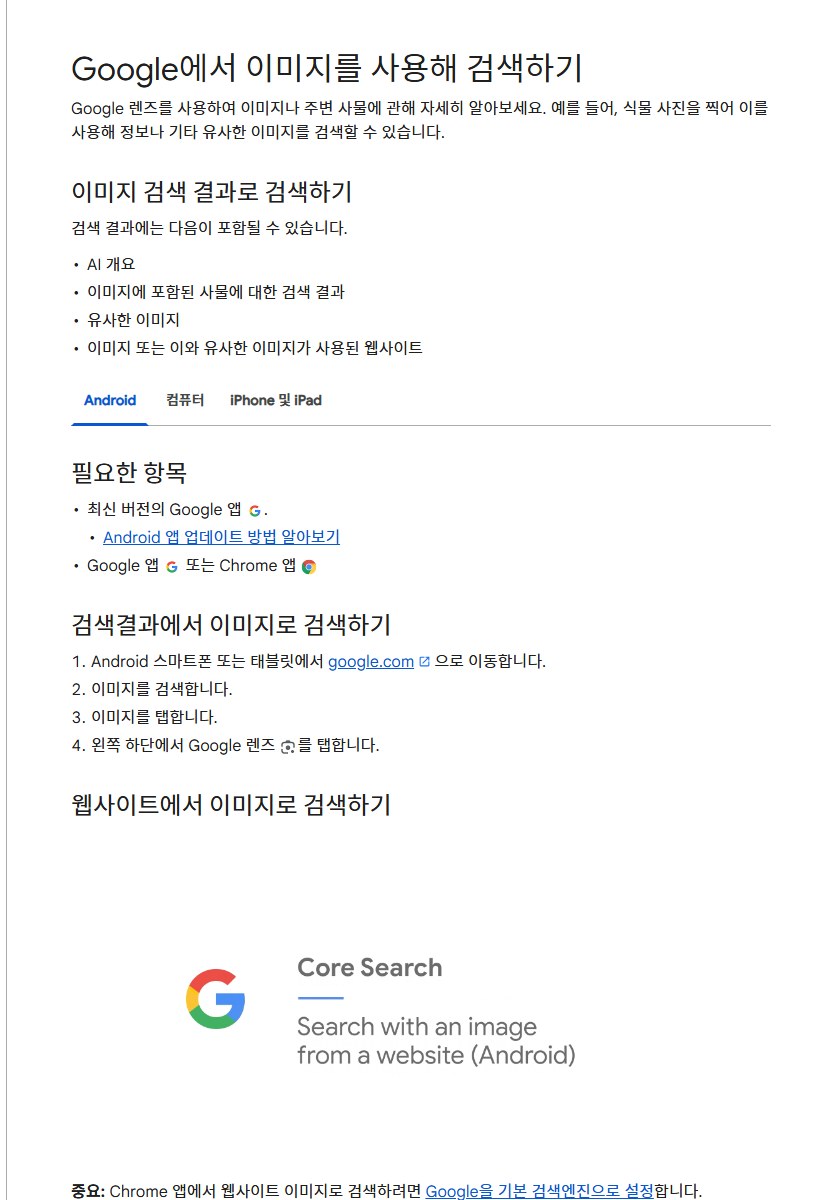
안드로이드에서는 구글 앱이나 크롬 앱의 검색창에서 렌즈 아이콘을 누릅니다. 카메라로 사물을 가리킨 뒤 검색을 누르거나, '스크린샷'에서 사진을 고르면 됩니다.
결과에는 AI 개요, 사진 속 사물에 대한 검색 결과, 비슷한 이미지, 그 이미지가 쓰인 웹사이트가 나올 수 있습니다.
더 구체적인 결과를 원하면 이미지에서 더 작은 영역을 고르라는 것이 구글의 요령입니다. 상자 모서리를 끌어 범위를 좁히고, '이 이미지에 관해 질문하기'로 검색어를 덧붙입니다.
웹사이트의 이미지는 길게 눌러 'Google 렌즈로 이미지 검색'을 고릅니다. 크롬 앱에서 이렇게 하려면 구글이 기본 검색엔진이어야 합니다.
촬영 버튼을 길게 눌러 말로 묻는 기능도 있지만, 지금은 영어 질문만 지원합니다.
컴퓨터에서는 크롬 오른쪽 위 더보기의 'Google 렌즈로 이 탭 검색'을 고르거나, 이미지를 마우스 오른쪽 버튼으로 눌러 'Google 렌즈로 검색'을 고릅니다. google.com의 '이미지로 검색'에 파일을 올리거나 이미지 주소를 붙여 넣어도 됩니다.
글자를 복사하고 번역할 때
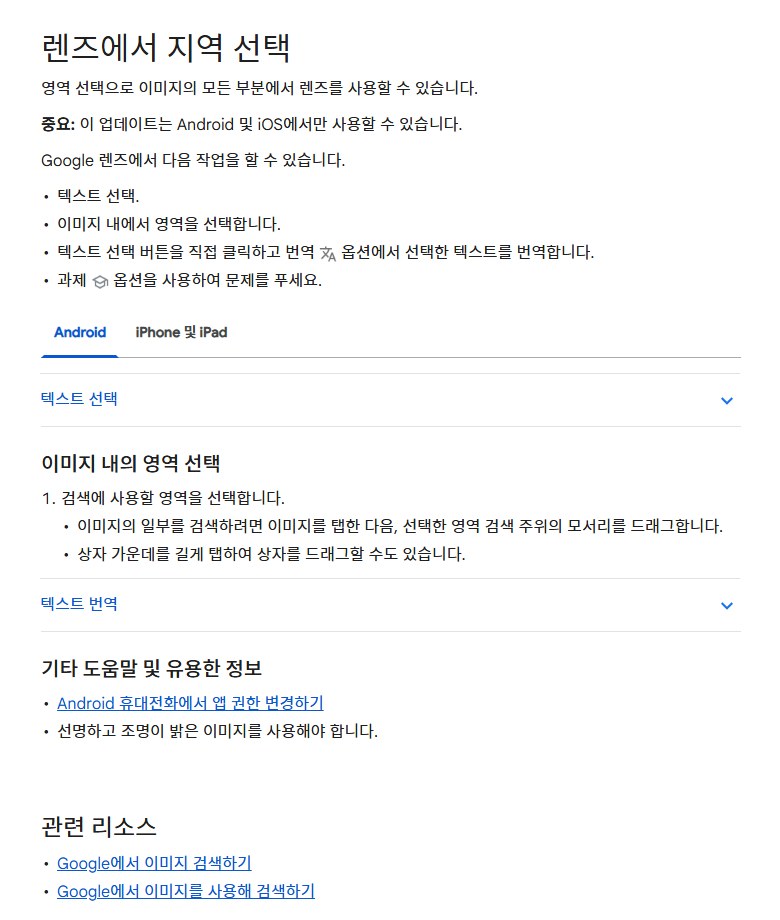
렌즈에서 '텍스트 선택'을 누르면 글자를 복사해 붙여 넣을 수 있습니다. 고른 내용에 따라 바로 할 수 있는 일도 달라집니다.
- 전화번호 — 전화 걸기, 문자 보내기, 연락처에 추가
- 이메일 주소 — 메일 보내기
- 주소 — 지도 보기
- 링크 — 웹사이트 열기
- 패키지(택배) 번호 — 배송 추적
'카메라로 검색'에서 '번역'을 고르면 사진 속 글자를 번역합니다. 왼쪽에서 원래 언어를 감지하고, 오른쪽에서 번역할 언어를 고르는 방식입니다. '듣기'를 누르면 고른 글자를 소리 내어 읽어 줍니다.
'과제'를 고르면 수학·과학 문제, 단어 문제, 도형·다이어그램 문제를 풀 때 도움을 받을 수 있습니다. 선명하고 밝은 사진을 쓰라는 당부가 붙어 있습니다.
구글은 이 영역 선택 기능이 안드로이드와 iOS에서만 된다고 적었습니다.
찍은 사진은 어디에 남을까?
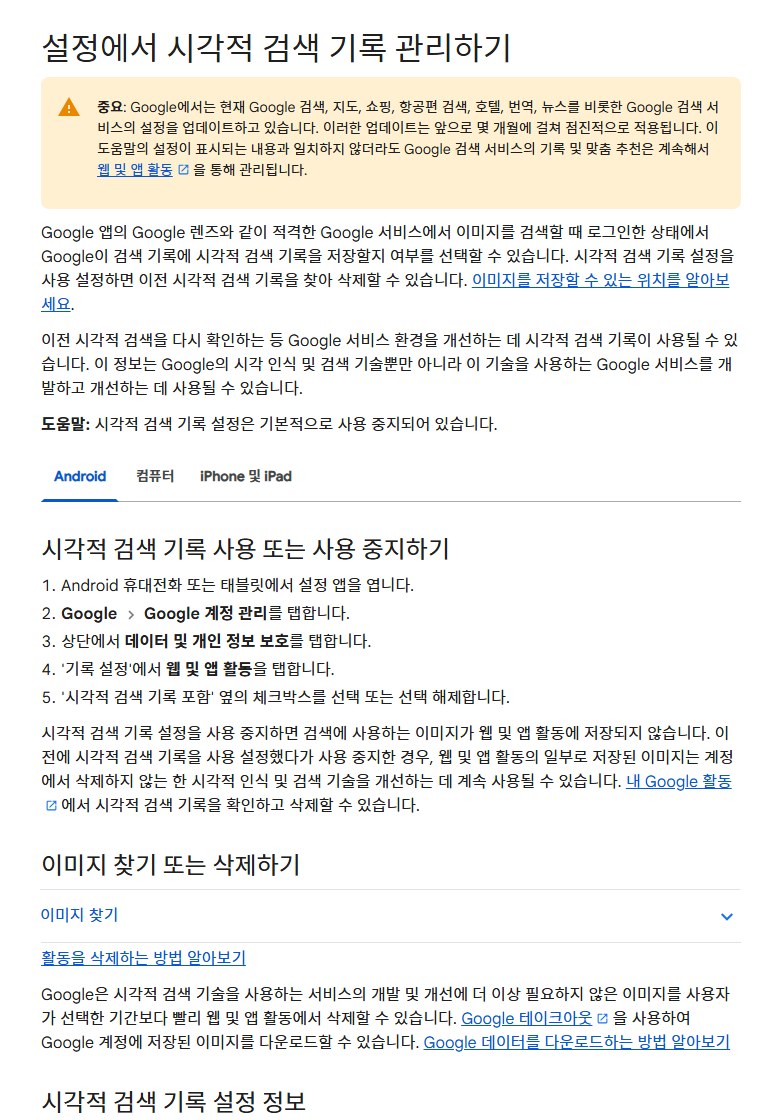
구글 앱의 렌즈, 안드로이드 빠른 검색창, 서클 투 서치로 검색한 이미지는 '시각적 검색 기록 포함'을 켰을 때만 웹 및 앱 활동에 저장됩니다. 이 설정은 기본적으로 꺼져 있습니다.
켜고 끄는 곳은 안드로이드 설정 → Google → Google 계정 관리 → 데이터 및 개인 정보 보호 → 웹 및 앱 활동입니다. 저장된 이미지는 내 Google 활동에서 확인하고 지울 수 있습니다.
꺼도 이전에 저장된 이미지는 남습니다. 켜 뒀다가 끈 경우, 이미 저장된 이미지는 계정에서 지우지 않는 한 시각 인식·검색 기술 개선에 계속 쓰일 수 있다고 구글은 적었습니다.
한 단계가 더 있습니다. '이미지 검색 기록 제공'을 켜면 사람 검토자가 저장된 이미지를 분석해, 생성형 AI 모델을 포함한 기술 개선에 쓸 수 있습니다.
이 설정도 기본은 꺼져 있습니다. 검토에 뽑힌 이미지는 계정과 연결이 끊긴 채 최대 4년 보관되고, 원본을 기록에서 지워도 그 기간 동안 남습니다.
그래서 구글은 검토자가 봐도 괜찮은 것만 올리고, 민감하거나 기밀인 정보는 공유하지 말라고 권합니다.
크롬의 렌즈는 조금 다릅니다. 페이지 스크린샷과 데이터가 구글로 가지만, 처리용 임시 저장 이상은 남기지 않아 페이지와 이미지가 학습에 쓰이지 않는다고 했습니다.
시각적 검색 기록 설정은 제미나이 앱 활동처럼 다른 설정에서 저장되는 이미지에는 영향을 주지 않는다는 점도 알아 둘 만합니다.
결국 확인할 것은 둘입니다. '시각적 검색 기록 포함'과 '이미지 검색 기록 제공'이 꺼져 있는지.
Google Lens searches objects in photos or on screen from the Google app or Chrome, and copies or translates text.
Images you search with Lens are not saved to your Google account by default; they are kept only if you turn on 'Include visual search history' in Web & App Activity, Google says.
On Naver's Q&A service, a search for 'Google Lens' returns 8,029 questions as of October 5.
Where do you open it on a phone?
On Android, tap the Lens icon in the search bar of the Google app or Chrome. Point the camera at something and tap search, or pick a photo from Screenshots.
Results can include an AI Overview, results about objects in the photo, similar images and websites that use the image.
For more specific results, Google advises selecting a smaller area of the image. Drag the box corners to narrow it, and add words with 'Ask about this image'.
For an image on a website, touch and hold it and choose 'Search image with Google Lens'. In the Chrome app this requires Google as the default search engine.
You can also hold the shutter button to ask by voice, but only questions in English are supported for now.
On a computer, choose 'Search this tab with Google Lens' from Chrome's More menu, or right-click an image and choose 'Search with Google Lens'. You can also upload a file or paste an image address in 'Search by image' on google.com.
Copying and translating text
Tap 'Select text' in Lens to copy and paste text. What you can do next depends on what you select.
- Phone number - call, send a text, add to contacts
- Email address - send an email
- Address - view on a map
- Link - open the website
- Package number - track the delivery
Choose 'Translate' under 'Search with your camera' to translate text in a photo: the language is detected on the left and you pick the target language on the right. 'Listen' reads the selected text aloud.
Choose 'Homework' for help with math and science problems, word problems, and geometry or diagram questions. Google asks for clear, well-lit photos.
Google notes that this region selection is available only on Android and iOS.
Where do your photos end up?
Images searched with Lens in the Google app, the Android quick search bar or Circle to Search are saved to Web & App Activity only when 'Include visual search history' is on. It is off by default.
Turn it on or off under Android Settings > Google > Manage your Google Account > Data & privacy > Web & App Activity. Saved images can be reviewed and deleted in My Google Activity.
Turning it off does not erase what was saved. If you turned it on and later off, saved images may still be used to improve visual recognition and search unless you delete them, Google says.
There is one more step: if you turn on contributing image search history, human reviewers may analyze saved images to improve technology, including generative AI models.
That setting is also off by default. Images picked for review are disconnected from your account and kept for up to four years, even if you delete the original from your history.
So Google advises sharing only what reviewers can see and not sharing sensitive or confidential information.
Lens in Chrome works a little differently: a screenshot and page data go to Google, but nothing is stored beyond temporary processing, so pages and images are not used for training, it says.
Note also that the visual search history setting does not affect images saved under other settings, such as Gemini Apps Activity.
In the end, check two things: that 'Include visual search history' and contributing image search history are off.