AI 에 쌓아둔 대화를 꺼내는 방법은 세 서비스가 다 다릅니다.

받는 경로도, 링크가 살아 있는 기간도, 다른 계정으로 옮길 수 있는지도 갈립니다. 공식 도움말을 나란히 놓고 정리했습니다.

먼저 알아둘 것이 하나 있습니다. 제미나이는 데이터를 다운로드해도 구글 서버에서 지워지지는 않는다고 명시합니다. 내보내기와 삭제는 다른 일입니다.

■ 챗GPT — 두 갈래, 그리고 옮기기 전에

길이 둘입니다. 프라이버시 포털에서 요청하거나, 로그인한 상태에서 설정으로 요청하는 것입니다.

설정에서 요청하는 쪽에는 조건이 붙습니다. 무료와 Go, 플러스, 프로, 그리고 자격이 되는 에듀 워크스페이스에서 됩니다. 비즈니스와 엔터프라이즈, 헬스케어 워크스페이스는 셀프 서비스가 안 되고 워크스페이스 소유자에게 문의해야 합니다.

로그아웃 상태에서도 안 됩니다. 시작하기 전에 계정에 연결된 이메일이나 전화번호에 접근할 수 있는지 확인하라고 안내합니다. 소유 확인을 요구할 수 있기 때문입니다.

놓치기 쉬운 경고가 하나 있습니다. 개인 워크스페이스를 비즈니스나 엔터프라이즈, 에듀로 옮기거나 합칠 계획이라면 옮기기 전에 먼저 내보내 받아서 확인해 두라는 것입니다.

개인 워크스페이스가 사라진 뒤에는 예전 내보내기 링크를 열지 못하고, 그 워크스페이스에서 다시 요청하지도 못할 수 있습니다.

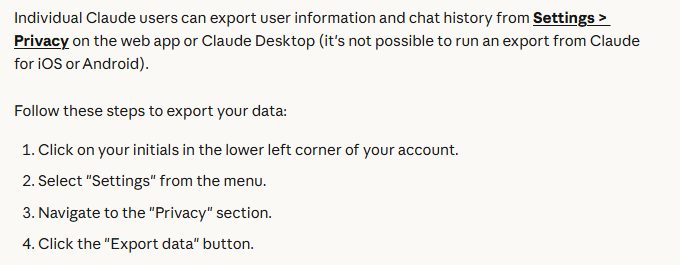
■ 클로드 — 24시간 안에 받아야 한다

클로드는 무료와 프로, 맥스 개인 사용자가 쓸 수 있습니다. 팀이나 엔터프라이즈 소속이라면 조직의 최고 소유자만 내보낼 수 있습니다.

자리는 이렇습니다.

  • 좌측 아래 이니셜을 누릅니다
  • 설정을 고릅니다
  • 프라이버시 항목으로 이동합니다
  • 데이터 내보내기를 누릅니다

주의할 점이 둘입니다. 첫째, 웹과 클로드 데스크톱에서만 됩니다. iOS 나 안드로이드 앱에서는 내보내기를 실행할 수 없습니다.

둘째, 링크 수명이 짧습니다. 준비가 끝나면 계정 이메일로 다운로드 링크가 오는데 전달 후 24시간이 지나면 만료됩니다. 만료되면 같은 절차를 다시 밟아 새로 받으면 됩니다.

받을 때 계정에 로그인돼 있어야 한다는 조건도 함께 적혀 있습니다.

■ 제미나이 — 테이크아웃에서 골라 담는다

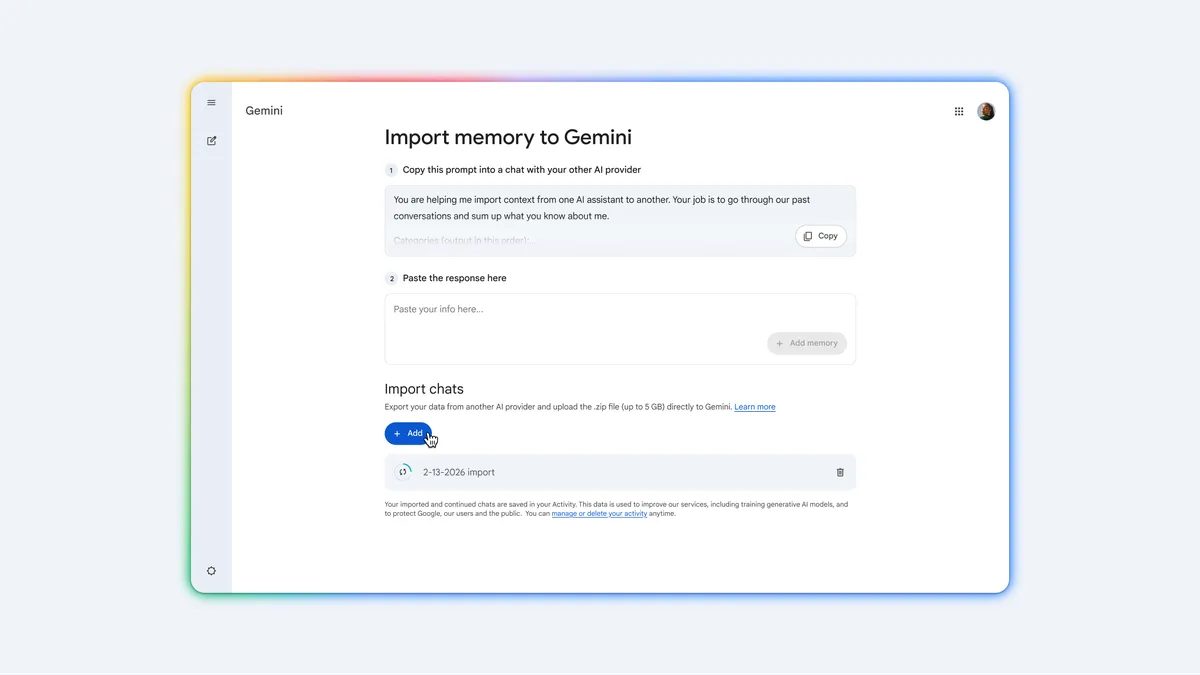
제미나이는 구글 테이크아웃을 씁니다. 기본값이 대부분의 구글 제품이라 그대로 두면 다른 서비스 데이터까지 함께 담깁니다.

제미나이 것만 받으려면 이렇게 합니다.

  • takeout.google.com 에서 제미나이와 같은 구글 계정으로 로그인합니다
  • 포함할 데이터 선택에서 모두 선택 해제를 고릅니다
  • Gems 데이터를 원하면 Gemini 옆 체크박스를 켭니다
  • 채팅과 생성된 미디어, 업로드를 원하면 내 활동을 켠 뒤 모든 활동 데이터에서 다시 모두 선택 해제하고 Gemini 앱만 체크합니다

받는 방법도 고릅니다. 이메일로 링크를 받으면 7일 동안 유효하고, 드라이브에 추가하면 파일 위치 링크가 이메일로 오는 대신 저장용량 계산에 포함됩니다.

한 가지 더 있습니다. 다운로드를 요청한 시점과 보관 파일이 만들어지는 시점 사이에 데이터를 바꾸면 그 변경은 파일에 들어가지 않을 수 있습니다.

답변 하나만 빼내는 길도 있습니다. 답변 아래 공유 및 내보내기에서 Docs 로 내보내거나 Gmail 초안을 만들 수 있고, 표가 있는 답변만 시트로 보낼 수 있습니다. 이미지가 든 표는 시트로 보내지 못합니다.

■ 계정을 지우면

그러면 계정 자체를 지우면 어떻게 될까요? 챗GPT 도움말이 가장 자세합니다.

계정 삭제는 영구적입니다. 지우면 챗GPT 와 API 를 포함한 오픈AI 서비스에 그 계정으로 접근할 수 없고, 데이터는 30일 안에 삭제됩니다. 법이 요구하거나 허용하는 범위에서 일부는 더 보관될 수 있습니다.

삭제된 계정은 되살릴 수 없습니다. 다만 완전히 삭제된 경우라면 30일 뒤 같은 이메일 주소로 새 계정을 만들 수 있습니다.

지우기 전에 확인할 것도 적어 두었습니다. 결제만 멈추거나 이메일 주소만 바꾸고 싶다면 계정을 지우지 않고도 할 수 있습니다. 대화 하나를 목록에서 치우고 싶을 뿐이라면 삭제 대신 보관을 쓰면 됩니다.

■ 옮겨 심을 수는 없다

내보낸 데이터를 다른 계정에 넣을 수 있을까요? 클로드는 안 된다고 못박았습니다. 내보낸 데이터는 다른 개인 클로드 계정으로 가져올 수 없고, 개인 계정 사이의 이전도 지원하지 않습니다.

다만 팀이나 엔터프라이즈 조직에 합류하는 경우라면 내보내기가 필요 없습니다. 개인 계정을 조직 워크스페이스로 바로 옮길 수 있다고 안내합니다.

두 갈래와 24시간, 7일, 그리고 30일. 꺼내는 일에 붙은 숫자들.

Getting your conversations out of an AI service works differently in each one.

The route, how long the link lives, and whether you can move it to another account all differ. Here they are side by side from the official help centres.

There is one thing to know first. Google states that downloading your Gemini data does not delete it from Google's servers. Exporting and deleting are separate acts.

ChatGPT: two routes, and one thing to do first

There are two paths: request through the Privacy Portal, or request an export from settings while signed in.

The settings route carries conditions. It is available on Free, Go, Plus, Pro and eligible Edu workspaces. Business, Enterprise and Healthcare workspaces have no self-service export; you contact the workspace owner.

It is also unavailable while logged out. Before starting, make sure you can reach the email or phone number linked to the account, since you may need to verify ownership.

There is a warning that is easy to miss. If you plan to move or merge a personal workspace into Business, Enterprise or Edu, request and download your export first, and check it.

Once the personal workspace is removed you may no longer be able to open an earlier export link, or request another from that workspace.

Claude: you have 24 hours

Claude offers exports to individual users on Free, Pro and Max. On Team or Enterprise, only the organisation's Primary Owner can run one.

The steps run like this.

  • Click your initials in the lower left corner
  • Select Settings
  • Go to the Privacy section
  • Click Export data

Two things to watch. First, it works on the web app and Claude Desktop only — you cannot run an export from Claude for iOS or Android.

Second, the link is short-lived. When the export is ready a download link arrives by email, and it expires 24 hours after delivery. If it lapses, repeat the process for a new one.

You also have to be signed in to your account to use the link.

Gemini: pick it out in Takeout

Gemini uses Google Takeout. Most Google products are included by default, so leaving it as-is pulls in data from other services too.

To take only Gemini, do this.

  • Sign in at takeout.google.com with the same Google account you use for Gemini
  • Choose Deselect all under the data selection
  • Tick the Gemini box if you want Gems data
  • For chats, generated media and uploads, tick My Activity, then deselect all again inside it and tick only Gemini Apps

You also choose delivery. A link by email is valid for seven days; adding it to Drive sends a link to the file's location instead, and it counts toward your storage.

One more thing. If you change data between requesting the download and the archive being built, those changes may not make it into the file.

You can also lift a single answer out. Under a response, share and export sends it to Docs or drafts a Gmail message, and only answers containing a table can go to Sheets — tables with images cannot.

If you delete the account

So what happens if you delete the account itself? OpenAI's guidance is the most detailed.

Deletion is permanent. You lose access to OpenAI services including ChatGPT and the API with that account, and the data is deleted within 30 days, with a limited set retained longer where law requires or permits.

A deleted account cannot be reactivated. If it was fully deleted, you can create a new account with the same email address after 30 days.

It also lists what to check first. If you only want to stop paying or change your email address, you can do that without deleting. And to clear one conversation from the sidebar, archive it instead of deleting.

You cannot replant it

Can exported data go into another account? Claude says no. An export cannot be imported into another personal Claude account, and migration between personal accounts is not supported.

If you are joining a Team or Enterprise organisation, though, you do not need an export — a personal account can be migrated directly into the organisation's workspace.

Two routes, 24 hours, seven days, and 30 days. The numbers attached to getting your data out.