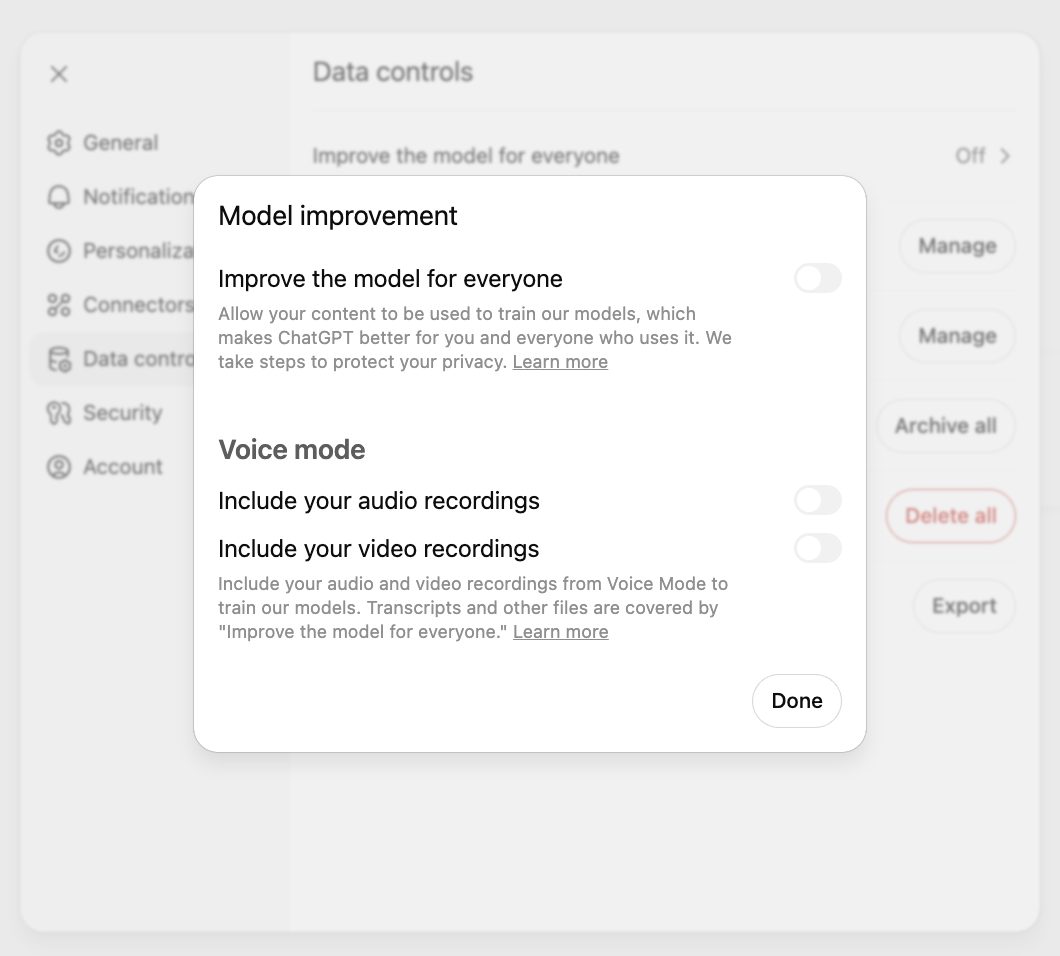
챗GPT와 클로드, 제미나이 모두 내 대화를 모델 학습에서 빼는 설정을 두고 있습니다.

문제는 이름이 셋 다 다르다는 점입니다. 어디를 눌러야 하는지도 다릅니다. 공식 도움말을 기준으로 세 곳의 경로를 정리했습니다.

챗GPT는 개인 요금제에서 데이터 공유가 기본으로 켜져 있습니다. 제미나이도 만 18세 이상이면 활동 기록 보관이 기본으로 켜집니다.

■ 챗GPT — 데이터 제어 안의 토글 하나

웹에서 로그인한 상태라면 순서는 이렇습니다.

  • 프로필 아이콘을 누릅니다
  • 설정으로 들어갑니다
  • 데이터 제어(Data Controls)로 이동합니다
  • Improve the model for everyone 을 끕니다

휴대폰에서는 어디일까요? 사이드바 메뉴를 열고 프로필 아이콘을 누른 뒤 데이터 제어를 고릅니다. 한 번 끄면 계정 전체에 적용되므로 기기마다 다시 할 필요는 없습니다.

끈다고 대화가 사라지지는 않습니다. 기록에는 그대로 남고 학습에만 쓰이지 않습니다. 음성 모드는 별도 제어로 따로 적용할 수 있습니다.

비즈니스와 엔터프라이즈, 에듀, API 는 기본적으로 입력과 출력을 학습에 쓰지 않습니다. 기본으로 켜져 있는 쪽은 플러스와 프로, 무료 등 개인 워크스페이스입니다.

■ 클로드 — 프라이버시 안의 AI 모델 개선

클로드는 프라이버시 안에 있습니다. 컴퓨터에서는 설정 메뉴에서 이름을 고른 뒤 설정으로 들어가 프라이버시를 선택합니다. 그 안의 Help Improve our AI models 를 끄면 됩니다. 모바일도 이름에서 설정, 프라이버시 순으로 같습니다.

여기서 한 가지 짚고 갈 것이 있습니다. 끄면 앞으로의 새 대화와 코딩 세션은 학습에 쓰이지 않고, 이전에 저장된 대화도 향후 학습에서 빠집니다.

다만 이미 시작된 학습과 이미 학습을 마친 모델에는 그대로 남습니다. 되돌릴 수 있는 것은 앞으로의 일뿐입니다.

■ 제미나이 — 활동 기록 보관을 끈다

제미나이는 설정 위치부터 다릅니다. 컴퓨터에서 제미나이에 접속한 뒤 설정 및 도움말에서 활동을 누릅니다. 활동 페이지로 바로 가는 주소도 안내합니다.

상단 근처에서 사용 중지, 또는 사용 중지 및 활동 삭제를 고르면 됩니다. 지난 활동까지 함께 지우려면 후자입니다.

삭제는 범위를 골라서 할 수 있습니다.

  • 전체 기간
  • 지난 1시간 또는 지난 1일
  • 사용자설정 범위로 특정 기간
  • 날짜별 또는 개별 활동 하나씩

자동 삭제 기본값은 18개월입니다. 3개월이나 36개월로 바꾸거나 자동 삭제 안 함으로 둘 수도 있습니다.

■ 껐다고 다 사라지지는 않는다

그러면 끄고 나면 아무것도 안 남을까요? 세 곳 모두 예외를 밝혀 두었습니다.

제미나이는 활동 기록 유지를 꺼도 서비스 제공과 의견 처리를 위해 대화가 최대 72시간 계정에 저장됩니다. 이 대화는 활동 목록에 표시되지 않습니다.

챗GPT와 클로드는 안전 분류기가 대화를 표시한 경우를 예외로 둡니다. 이때는 유해 콘텐츠 탐지나 정책 집행, 안전 연구 목적으로 쓰일 수 있습니다. 72시간, 그리고 분류기가 걸러낸 대화. 세 곳이 밝힌 예외는 이 둘입니다.

제미나이는 활동 기록 보관을 끄면 연결해 쓸 수 있는 앱도 기기 지원과 Gemini Notebook, 메시지, WhatsApp 으로 줄어듭니다. 공유했던 채팅을 지워도 공개 링크는 따로 지워야 합니다.

■ 아예 흔적을 남기지 않으려면

설정을 바꾸는 대신 대화 단위로 끊는 방법도 있습니다.

챗GPT의 임시 채팅은 30일 뒤 시스템에서 삭제되고 학습에 쓰이지 않으며 기록과 메모리에도 남지 않습니다. 남용 감시를 위한 검토만 있을 수 있습니다.

클로드에는 시크릿 채팅이 있습니다. 프로젝트 밖에서 새 대화를 시작하면 우측 상단에 유령 아이콘이 보이고, 누르면 검은 테두리와 함께 시크릿 채팅으로 바뀝니다. 무료부터 엔터프라이즈까지 모든 요금제에서 쓸 수 있습니다.

대신 제약이 있습니다. 시크릿 채팅은 일반 채팅으로 바꿀 수 없고, 프로젝트 안에서는 유령 아이콘이 나타나지 않습니다. 닫으면 다시 열 수 없으니 필요한 내용은 미리 옮겨 두어야 합니다.

토글 하나, 활동 페이지 하나, 그리고 대화 단위의 임시 모드. 세 서비스가 제공하는 통제 수단은 이 셋입니다.

ChatGPT, Claude and Gemini all offer a way to keep your conversations out of model training.

The difficulty is that all three call it something different, and all three keep it somewhere different. Here are the paths, taken from each company's own help centre.

ChatGPT has data sharing on by default on personal plans. Gemini turns activity keeping on by default for anyone eighteen or over.

ChatGPT: one toggle inside Data Controls

Signed in on the web, the order runs like this.

  • Click your profile icon
  • Select Settings
  • Go to Data Controls
  • Turn off Improve the model for everyone

And on a phone? Open the side-bar menu, tap your profile icon and choose Data Controls. Turning it off applies to the whole account, so there is no need to repeat it per device.

Switching it off does not remove your conversations. They stay in your history and simply are not used for training. Voice mode is a separate control that can be applied as well.

Business, Enterprise, Edu and the API do not use inputs and outputs for training by default. It is the personal workspaces - Plus, Pro and Free - where sharing starts switched on.

Claude: Help Improve our AI models, under Privacy

Claude keeps it under Privacy. On a computer, select your name from the settings menu, go to Settings, then Privacy, and toggle off Help Improve our AI models. On mobile the route is the same: your name, then Settings, then Privacy.

One point deserves attention. Once it is off, new chats and coding sessions are not used for future training, and previously stored conversations drop out of future training runs too.

But anything in training that has already begun, and anything in models already trained, stays there. Only the future is reversible.

Gemini: switch off activity keeping

Gemini keeps the control somewhere else entirely. Open Gemini on a computer, then choose Activity from settings and help. The help page also gives a direct address for the activity page.

Near the top, choose to turn it off, or to turn it off and delete past activity. The second option is the one that clears what is already there.

Deletion can be scoped.

  • All time
  • The past hour or the past day
  • A custom date range
  • A single day, or one activity item at a time

Auto-delete defaults to eighteen months. You can change it to three or thirty-six months, or switch auto-deletion off entirely.

Off does not mean gone

So is nothing kept once you switch it off? All three set out their exceptions.

Gemini stores conversations on the account for up to 72 hours even with activity keeping off, to run the service and process feedback. Those conversations do not appear in the activity list.

ChatGPT and Claude both carve out conversations flagged by their safety classifiers. Those may still be used to detect harmful content, enforce policy, or advance safety research. Seventy-two hours, and whatever a classifier catches. Those are the stated exceptions.

Gemini also narrows what you can connect once activity keeping is off, down to device support, Gemini Notebook, Messages and WhatsApp. And deleting a shared chat does not delete its public link, which has to be removed separately.

Leaving no trace at all

Rather than changing a setting, you can also work chat by chat.

ChatGPT's Temporary Chats are deleted from OpenAI's systems after 30 days, are not used for training, and leave nothing in your history or memory. They may be reviewed only to monitor for abuse.

Claude has incognito chats. Start a new chat outside a project and a ghost icon appears in the upper right; clicking it switches to incognito, marked by a black border. It is available on every plan from Free to Enterprise.

There are limits. An incognito chat cannot be converted into a regular one, and the ghost icon does not appear inside projects. Close it and it cannot be reopened, so anything worth keeping has to be saved first.

One toggle, one activity page, and a per-conversation temporary mode. Those are the three levers on offer.