


카카오톡 안의 AI는 'ChatGPT for Kakao'입니다. 따로 앱을 깔 필요 없이 채팅 탭 위쪽의 ChatGPT 버튼을 누르면 대화가 열립니다.
친구와 이야기하던 채팅방에서 부를 수도 있습니다. ChatGPT 챗봇을 추가한 뒤 '@ChatGPT'를 붙여 물으면 됩니다.
네이버 지식iN에서 '카카오톡 AI'로 검색되는 질문이 10월 6일 기준 23,497건입니다.
채팅 탭 위쪽 버튼 하나
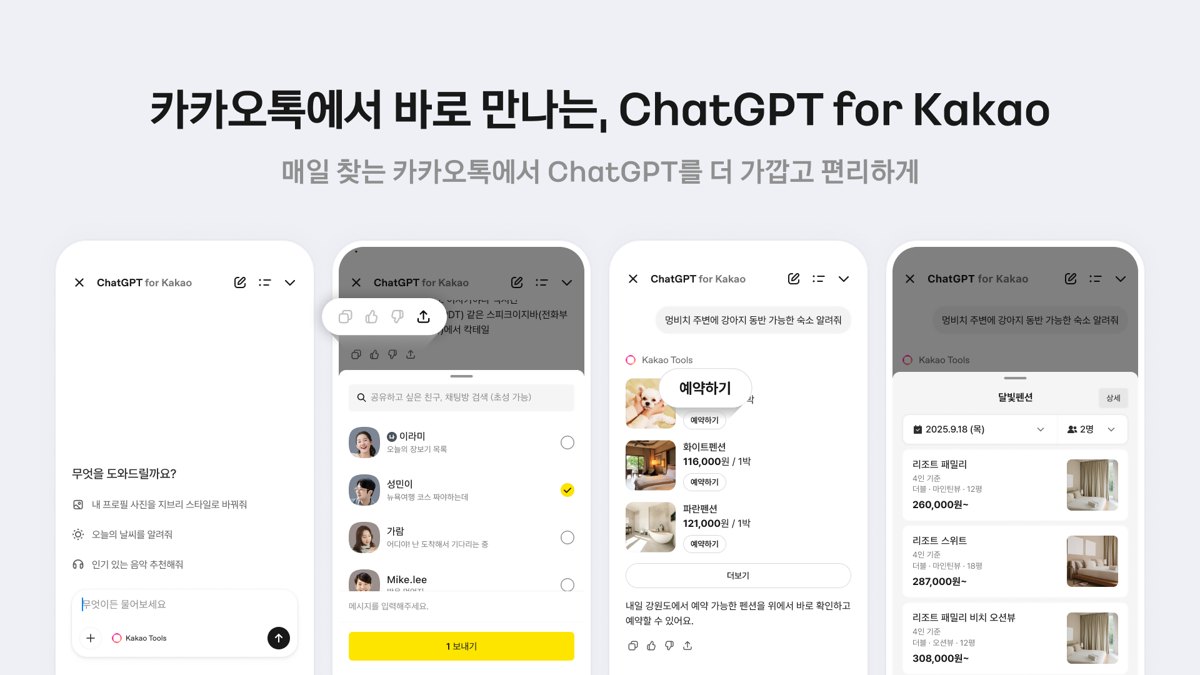
카카오가 오픈AI와 함께 개발해 지난해 10월 28일 내놓은 서비스입니다. 한국에서만 쓸 수 있고, 올해 5월 기준 누적 가입자가 1,100만 명을 넘었습니다.
ChatGPT를 쓰던 사람은 기존 계정을 연결하면 됩니다. 처음이라면 카카오 계정으로 가입할 수 있고, 이렇게 만든 계정은 ChatGPT 앱에서도 그대로 쓸 수 있습니다.
가입이나 로그인 없이도 써 볼 수 있습니다. 다만 무료 이용자에게는 ChatGPT와 마찬가지로 사용 한도가 있습니다.
버튼이 안 보인다면 앱부터 확인합니다. 오픈AI 도움말은 한국 휴대전화 번호로 등록된 카카오톡 최신 버전에서 확인할 수 있다고 안내합니다.
PC에서도 됩니다. 카카오는 7월 15일 정기 업데이트에서 이용 범위를 PC 카카오톡으로 넓혔습니다. 채팅탭 상단의 'ChatGPT' 칩을 누르면 모바일에서 쓰던 흐름이 그대로 이어진다고 했습니다.
채팅방에서 바로 부르려면
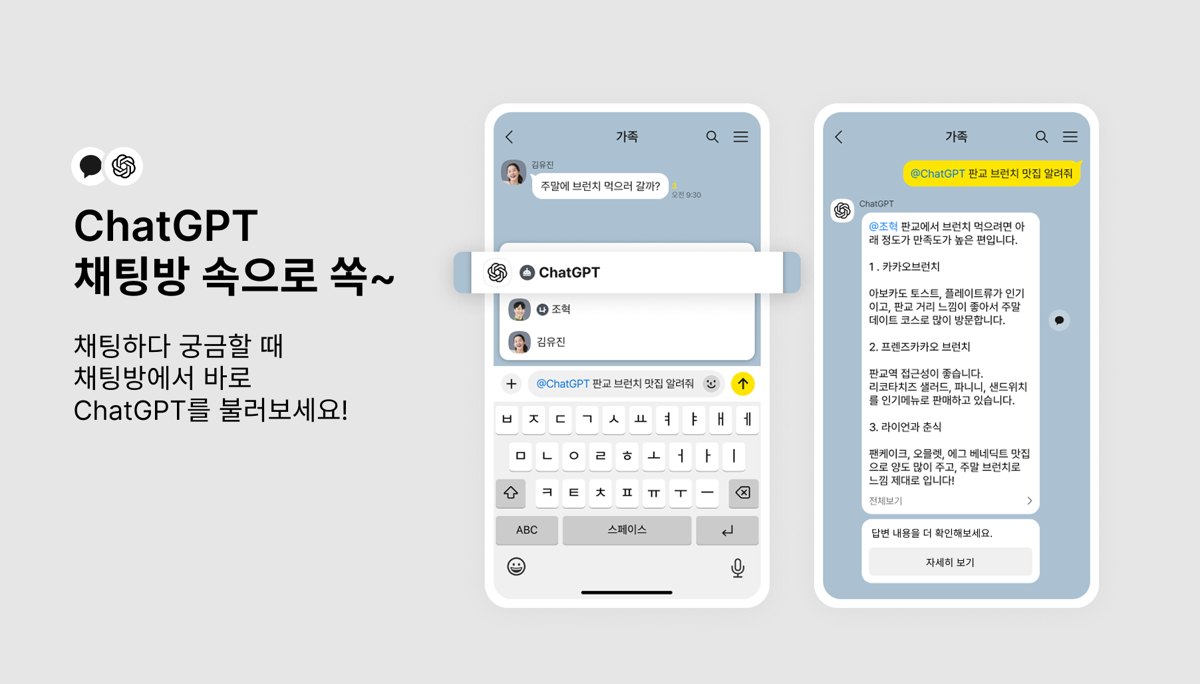
6월 16일에는 채팅방용 'ChatGPT 챗봇'이 나왔습니다. 그룹 채팅방과 1:1 채팅방에서 쓸 수 있습니다.
채팅방 우측 상단 메뉴에서 '챗봇'을 고르고 ChatGPT 챗봇을 추가합니다. 그다음 입력창에서 '@'와 함께 챗봇을 멘션하고 질문을 쓰면 됩니다.
"@ChatGPT 생일 축하 메시지 작성해 줘"처럼 쓰면 채팅방 안에서 바로 답이 옵니다. 입력창 아래 키보드 툴바의 'ChatGPT' 버튼을 눌러 입력해도 됩니다.
질문은 아직 글자로만 넣을 수 있습니다. 대신 "@ChatGPT 바다 풍경 그려줘"처럼 그림을 요청하면 이미지로 답합니다.
대화를 더 이어가려면 답변 말풍선 아래 '자세히 보기'를 누릅니다. ChatGPT for Kakao 화면으로 넘어가 계속 물을 수 있습니다.
카카오 도구가 붙으면 생기는 일
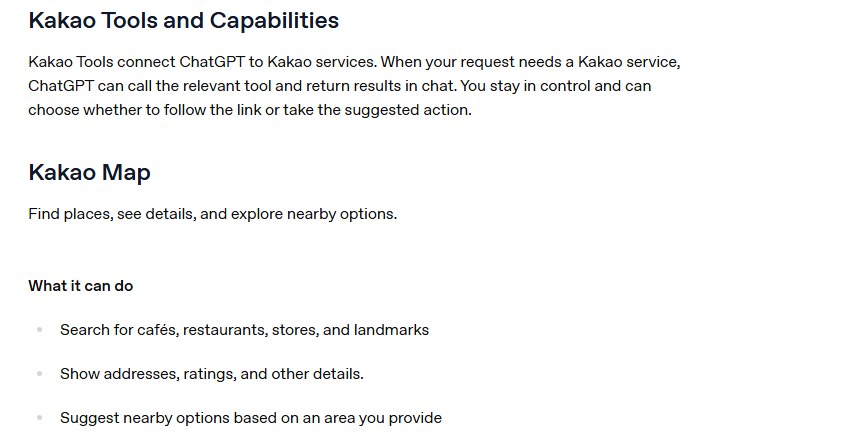
ChatGPT for Kakao에는 카카오 서비스를 불러오는 'Kakao Tools'가 붙어 있습니다. 출시 때 들어간 것은 카카오맵, 카카오톡 예약하기, 카카오톡 선물하기, 멜론입니다.
"합정역 근처에 크로플 파는 곳을 알려줘"라고 물으면 카카오맵을 불러 위치와 정보를 보여 주는 식입니다. 도구는 질문과 관련 있고 지원될 때만 나타난다고 오픈AI는 적었습니다.
링크를 따라갈지, 제안된 행동을 할지는 이용자가 고릅니다. 예약은 카카오에서 마치도록 연결되고, 선물은 카카오톡 선물하기로 넘어가 사고 보냅니다.
정보가 어디로 가는지도 알아 둘 만합니다. 대화 내용은 서비스를 제공하는 데 처리되고, 카카오 도구를 쓰면 요청을 처리하는 데 필요한 내용이 그 카카오 서비스에 전달됩니다.
카카오 쪽 데이터는 카카오 정책을, ChatGPT에 남는 대화 사본은 오픈AI 정책과 설정을 따릅니다. 카카오는 대화 저장 여부와 AI 학습 반영 여부를 이용자가 직접 고를 수 있다고 밝혔습니다.
혼자 물어볼 때는 채팅 탭의 버튼을, 친구들과 같이 볼 답이 필요할 때는 채팅방의 '@ChatGPT'를 쓰면 됩니다. 장소·예약·선물처럼 카카오 서비스와 엮인 질문이라면 Kakao Tools가 함께 붙습니다.
The AI inside KakaoTalk is ChatGPT for Kakao. There is no separate app to install: tap the ChatGPT button at the top of the Chat tab and a conversation opens.
You can also call it from a chatroom where you are talking with friends: add the ChatGPT chatbot, then ask with '@ChatGPT'.
On Naver's Q&A service, a search for 'KakaoTalk AI' returns 23,497 questions as of October 6.
One button at the top of the Chat tab
Kakao developed the service with OpenAI and launched it on October 28 last year. It is available only in Korea, and cumulative sign-ups passed 11 million as of May this year.
If you already use ChatGPT, link your existing account. New users can sign up with a Kakao account, and that account also works in the ChatGPT app.
You can try it without signing up or logging in, but free users have usage limits, just as in ChatGPT.
If you can't see the button, check the app first. OpenAI's help page says it appears in the latest version of the KakaoTalk Korea app registered with a Korean phone number.
It works on PC too. In its July 15 regular update, Kakao extended the service to KakaoTalk for PC; tap the 'ChatGPT' chip at the top of the Chat tab and your mobile flow carries over, Kakao said.
Calling it inside a chatroom
On June 16, Kakao added a ChatGPT chatbot for chatrooms. It works in group chats and one-on-one chats.
Open the menu at the top right of a chatroom, choose 'Chatbot' and add the ChatGPT chatbot. Then mention it with '@' in the input field and type your question.
Type something like "@ChatGPT write a birthday message" and the answer appears right in the chatroom. You can also tap the 'ChatGPT' button on the keyboard toolbar below the input field.
Prompts are text only for now. Image requests do work, though: ask "@ChatGPT draw an ocean scene" and it answers with an image.
To keep the conversation going, tap 'See more' under the answer bubble. It opens ChatGPT for Kakao, where you can continue asking.
What Kakao Tools add
ChatGPT for Kakao includes Kakao Tools, which call Kakao services. At launch they covered Kakao Map, KakaoTalk Reservations, KakaoTalk Gift and Melon.
Ask for a croffle shop near Hapjeong Station, for example, and it calls Kakao Map to show locations and details. Tools appear only when relevant and supported, OpenAI notes.
You choose whether to follow a link or take the suggested action. Reservations are completed in Kakao, and gifts are bought and sent through KakaoTalk Gift.
It is worth knowing where your information goes. Conversations are processed to provide the service, and when a Kakao Tool is used, the details needed for your request are shared with that Kakao service.
Data on the Kakao side follows Kakao's policies, while the copy of a conversation in ChatGPT follows OpenAI's policies and controls. Kakao says users can choose whether conversations are saved and whether they are used for AI training.
Use the Chat tab button when you are asking alone, and '@ChatGPT' in a chatroom when friends need to see the answer. For questions tied to places, bookings or gifts, Kakao Tools come along.
Sources · Kakao · Kakao · Kakao · OpenAI Help Center